Thursday, October 31, 2013

Allwinner A13 Q8 51324 Tablet Firmware software ROM

Q8  51324 Allwinner A13

 Tablet Firmware software 


This firmware is suitable for Allwinner A13 Tablet with board id Q8 51324. For flashing this tablet you need Livesuit or Phoenix Suit flashing tool . If you are new with flashing tablet rom then there is brief tutorial available for how to use flashing tools with tablet. You can also hard reset tablet via Android Recovery
You can also use : Android Multi Tools

how to know what  Chipset does your tablet have  ?

There are many Chipset  so be very careful .

The following firmware / ROM file will be used   when your Android tablet facing various problems . In case of
1. Forgotten Pattern Lock , Android OS generating errors , Tablet restart , Hang on logo or too many pattern attempts. 
you can use this Android Tablet firmware,  ROM to make your Android China tablet working again . Make sure to charge battery . Power failure during flashing may result dead or broken tablet.
Flashing stock firmware should be last option


Labels: , , , , ,

Monday, October 28, 2013

AOC MW0811 V.1.24 8'' Tablet firmware software


AOC MW0811 8'' Tablet firmware software 
FIRMWARE V.1.24 
BUILD 110116.1455.126

Specification:

Model :                            Breeze MW0811
Screen Size :                    8 Inch TFT
CPU  :                              600 MHZ 
Display :                          800 x 480px 
RAM :                             256 MB
Memory :                        4 GB
External Memory :         Micro SD (Support upto 8gb)
Operation System : Android 2.1 
Dual camera; Front:      0.3 megapixels; Back: 2.0 megapixels
HDMI :                          Available 
Bluetooth :                     Available 
Chipset :                        ROCKCHIP
Flashing Tool :              RKbatch Tool
Flashing Tutorial :        Tutorial for Rockchip RKbatch Tool

Labels: , , , , ,

Monday, September 30, 2013

U35GT-W(RK903) Tablet Official Firmware


U35GT-W(RK903) Tablet Official Firmware 

Chipset : Rockchip
Flashing Tool : RKBatchTool

Labels: , , , , , ,

Cube U9GT5 Quad core Tablet Firmware


Cube U9GT5 Quad core Tablet Firmware 
Chipset : Rockchip
Flashhing Tool : RKBatchTool


Labels: , , , , , ,

Cube U30GT2 Android4.2 Tablet Firmware

U30GT2 Android4.2 Tablet Firmware 

Chipset : Rockchip
Flashing Tool : RKBatchTool


Labels: , , , , , ,

CUBE U35GTS(wifi module RK903) 4.2 Tablet Firmware

CUBE U35GTS(wifi module RK903) 4.2 Tablet Firmware 

Chipset :Rockchip
Flashing Tool :RKBatchTool


Labels: , , , , , ,

CUBE U25GT Dual Core Tablet Official Firmware


 CUBE U25GT Dual Core Tablet Official Firmware 
Chipset: (Rockchip) 
Flashing Tool : RKBatchTool


Labels: , , , , , ,

Thursday, September 26, 2013

F2S 4.0.4 firmware 20121129.1.1.1 Tablet Firmware

F2S 4.0.4 firmware 20121129.1.1.1


Labels: , , , , , ,

F2S (A13) 4.0.4 firmware 20121129.1.1.1 Tablet Firmware

F2S (A13) 4.0.4 firmware 20121129.1.1.1


The CPU is A13 with no HDMI, pad use this firmware.

Please rename the download firmware in English, Otherwise , the upgrade

will failed. Jelly Bean4.1.1 firmware is editing at present.F9 series

Jelly Bean 4.1.1 firmware is open. Other models will gradually open

after firmware testing stability

Labels: , , , , , ,

F1 (A10) 4.1.1 Updated firmware 20130319.2.0.6

F1 (A10) 4.1.1 Updated firmware 20130319.2.0.6


Labels: , , , , , ,

Zenithink C93 (10.1"+8GB) Android4.1 2013-06-26


Zenithink C93 (10.1"+8GB) Android4.1 2013-06-26.
This version suits to C93 model with barcode C93S-xxx-8GB-
ZNSxxx-xx.


Using TF card
First extract the firmware which you get or download, then copy the whole "zt-update" directory into the root directory of TF card.
Put the TF card into TF card slot, then press the "Back" button at the same time to press the power-on button, then operate as per the reminders shown on the screen, the machine will be installed the firmware and then reboot.


Note: keep charged when the machine is being installed the firmware. Please hold the "Back" and Power-on button for at least 5 seconds.


Labels: , , , , , ,

Zenithink 10.1" C93 (1024MB+8GB) Android4.1 2013-05-22_H6_1f

Zenithink 10.1" C93 (1024MB+8GB) Android4.1 2013-05-22_H6_1f

This version suits to C93 model with barcode MXC93-xxx-1f-H6-xxxxxx.


Using TF card
  • First extract the firmware which you get or download, then copy the whole "zt-update" directory into the root directory of TF card.
  • Put the TF card into TF card slot, then press the "Back" button at the same time to press the power-on button, then operate as per the reminders shown on the screen, the machine will be installed the firmware and then reboot.
Note: keep charged when the machine is being installed the firmware.
Please do remember to press "Camera" or "Back" key while you see "Found 'SPL:ZT283_h6_1f_600', matchdo boot update? 'CAMERA+' key sure, otherwise cancel".

Labels: , , , , , ,

Zenithink C94 10.1" (1024MB+8GB) Android4.2 2013-09-03 GT2005 Version

10.1" C94 (1024MB+8GB) Android4.2 2013-09-03 GT2005 Version.

This version suits to C94 model with barcode C94S-FT-8GB-xxxxxx-x.

Upgrading with PC via USB cable
  • 1. First download and install the PhoneixSuitV1.0.3.
  • 2. Then download the corresponding firmware file and extract it into a temporary folder.
  • 3. Open Phoneix Suit software, connect your tablet(power on status) with USB cable. After the tablet is successfully connected, select the Onekey-upgrading, and then select the corresponding firmware file, confirm your action.
Note: keep charged when the machine is being installed the firmware. Please see the detail procedure file (C94_PC_upgrading.zip)


Labels: , , , , , ,

Zenithink 10.1" C93 8GB 20A13-08-15 version dual camera Firmware

Zenithink 10.1" C93 8GB 20A13-08-15 version dual camera 


This version suits to C93(two cameras) model with barcode C93-K5-xxx-8GB-ZNSxxx-xx.

Using TF card
First extract the firmware which you get or download, then copy the whole "zt-update" directory into the root directory of TF card.
Put the TF card into TF card slot, then press the "Volume Plus" button at the same time to press the power-on button, then operate as per the reminders shown on the screen, the machine will be installed the firmware and then reboot.


Note: keep charged when the machine is being installed the firmware.


Labels: , , , , , ,

Zenithink C94 10.1" (1024MB+8GB) Android4.2 2013-09-03 GC2035 FIRMWARE

10.1" C94 (1024MB+8GB) Android4.2 2013-09-03 GC2035 Version 

Android Tablet Firmware 
This version suits to C94 model with barcode C94-L1-FP3-8GB-xxxxxx-x.

Upgrading with PC via USB cable
  • 1. First download and install the PhoneixSuitV1.0.3.
  • 2. Then download the corresponding firmware file and extract it into a temporary folder.
  • 3. Open Phoneix Suit software, connect your tablet(power on status) with USB cable. After the tablet is successfully connected, select the Onekey-upgrading, and then select the corresponding firmware file, confirm your action.
Note: keep charged when the machine is being installed the firmware. Please see the detail procedure file (C94_PC_upgrading.zip)


Labels: , , , , , ,

Tuesday, September 10, 2013

Lemon Tablet LT-29 Android Tablet Firmware

Lemon Tab LT-29 Firmware


Labels: , , , , , ,

Sunday, September 8, 2013

PIRANHA Business II Tab 7.0 Official Firmware.

Business II Tab 7.0

Tablet Firmware . 


Allwinner A10 CPU

1.4 GHz 

16 GB 

1 GB DDR3 RAM 

0.3 MP Front Cam 3.2 MP Rare Cam  

 HDMI 

 3G WIFI Tablet PC


Before Proceeding must read :


Download 4.1 Jellybean.


you can use this Android Tablet firmware,  ROM to restore your Android China tablets to generic firmwares or upgrades . Make sure to charge battery upto 60%. Power failure during flashing may result dead or broken tablets.
Note : Consider flashing Stock firmwares , as a last option.

Required Flashing Tools & Tutorials


  • Tablet Flashing Tool :  Firmware upgrade tool LiveSuit & Drivers
  • Tablet Flashing Tool:   Firmware upgrade Tool Phoenix Usb Pro
  • Flashing with SD Card:Firmware update instruction with microSD card 
  • LiveSuit Tutorial :  how to flash tablet with LiveSuit    

  • When Flashing a tablet is necessary ? 

    Restoring your tablet PC or smartphones to stock ROM is necessary when android tablet or smartphones faces the following problems. 
    1. Forgotten Pattern Lock on Android Tablets. (If undone by Hard reset)
    2.Too many pattern attempts / Reset user lock.(If undone by Hard reset)
    3. Tablets PC stuck on Gmail account.
    4. Android Tablet PC stuck on Android logo.
    5.Unexpected error / Force close errors generate by Android operating system .
    6. Tablet Android  hang on start-up / Multiple errors generating by OS. 
    7. Market Android / Google play having problems or generating errors. 
    8.Upgrading to new Android version.


    Labels: , , , , , ,

    PIRANHA Aristotle Tab 7.0 MT6577 Official firmware.


    PIRANHA Aristotle Tab 7.0 Official firmware. 


    Tablet Spec

    MT6577 Dual Core 

    1.5 GHz 

    8 GB 

    1 GB DDR3 RAM 

     3.2 MP front camera and 8.0 MP back

     HD Screen 

    HDMI  

    3G 

     WIFI

     GPS 

     Bluetooth 

    Labels: , , , , , ,

    Wednesday, September 4, 2013

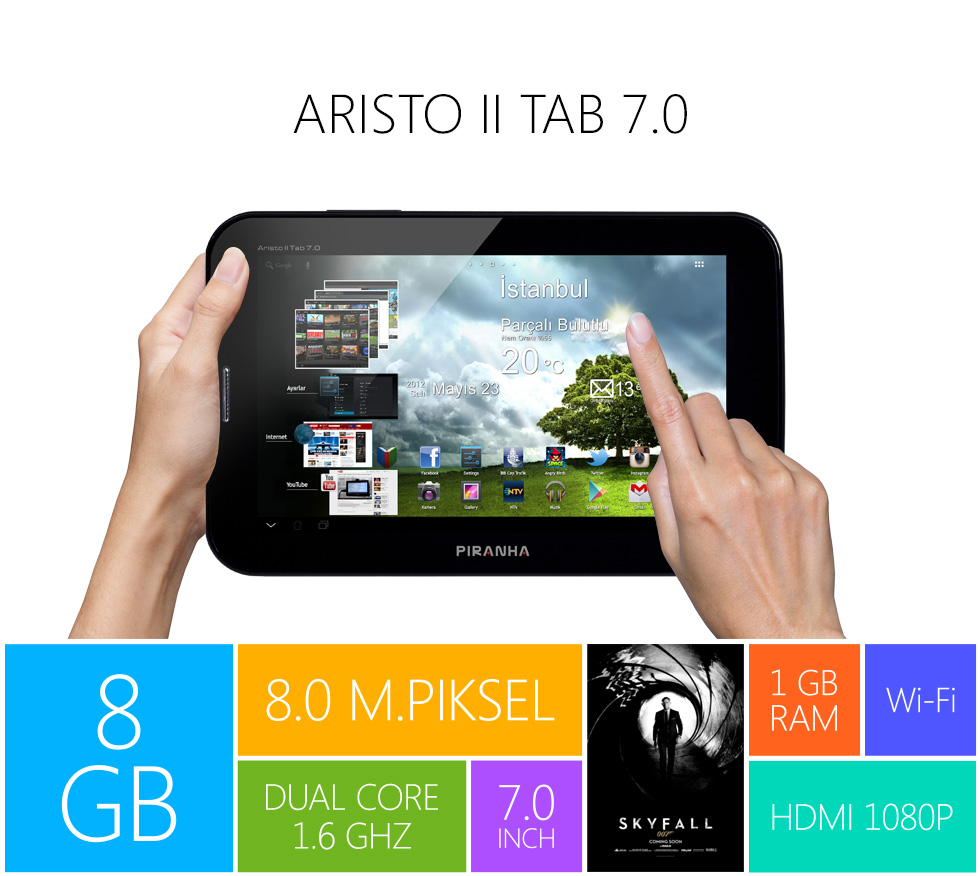
    Piranha Aristo II Tab 7.0 Tablet firmware.


    Piranha Aristo II Tab 7.0


    Labels: , , , , , ,

    Sunday, September 1, 2013

    Touchmate MID-600 Tablet Firmware.

    Touchmate MID-600Android Tablet Firmware . 

    20120738640001 to 20120738642006

    Chipset : Allwinner 


    When I need To Flash Tablet ?


    1. Forgotten Pattern Lock on Android Tablets
    2.Too many pattern attempts / Reset user lock.
    3. Tablets PC stuck on Gmail account.
    4. Android Tablet PC stuck on Android logo.
    5. Tablet Android  hang on start-up / Multiple errors generating by OS. 
    6. Google play store having problems or generating errors. 
    7.Upgrading to new Android version.
    you can use this Android Tablet firmware,  ROM to restore your Android China tablets to generic firmwares or upgrades . Make sure to charge battery upto 60%. Power failure during flashing may result dead or broken tablets.
    Note : Flashing generic tablet firmware should be last option.

    How to Flash Touchmate Tablets ?


     Download Flashing Tools :

     Tablet Flashing Tools:

    If you new see Flashing Tutorials :

    Flashing Tutorials for Allwinner Tablets:


    Labels: , , , , , ,