How to add live chat widget to your blogspot blog
Live chat system helps you interact with your visitors one on one. Interacting with your visitors and providing immediate answers to the questions they ask keeps them coming back to your blog, thus, improving your traffic.
To add live chat widget to your blog, follow the guide below:
Step One: First, sign up at Mylivechat. Check your email and verify your account via the link sent in the email.
Step Two: Login to your Dashboard
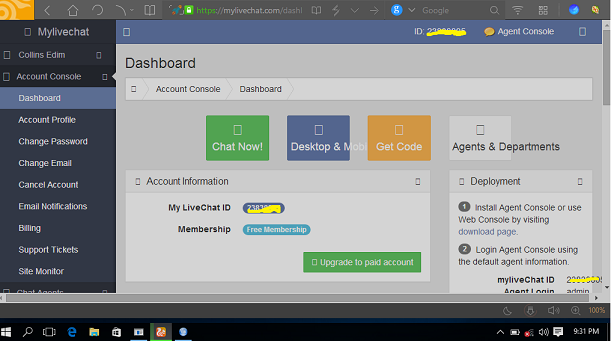
Step Three: Click on Deployment tab (located at the left menu options), then select Embedded Chat.
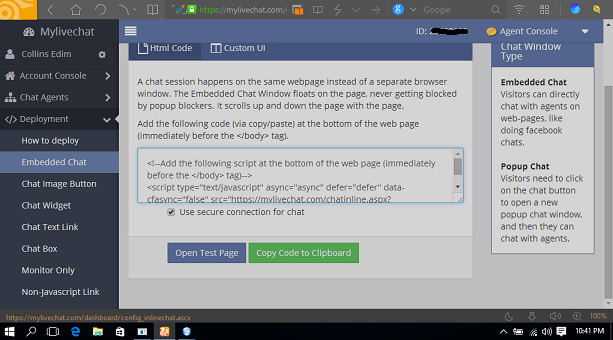
Step Four: Copy all the code from the box shown in the screenshot above.
Step Five: Login to your blogger Dashboard > Templates > Edit HTML
Step Six: Search for </body> and add the code you copied before the </body> tag
Should then look like this...
<!--Add the following script at the bottom of the web page (immediately before the </body> tag)-->
<script type="text/javascript" async="async" defer="defer" data-cfasync="false" src="https://mylivechat.com/chatinline.aspx?hccid=xxxxxxxx"></script>
</body>
Note: XXXXXXX is your live chat ID.
Step 7: Save and exit.
Visit the downloads page to download the Windows, Android or iOS client. The web console does everything pretty cool though. Its your call!
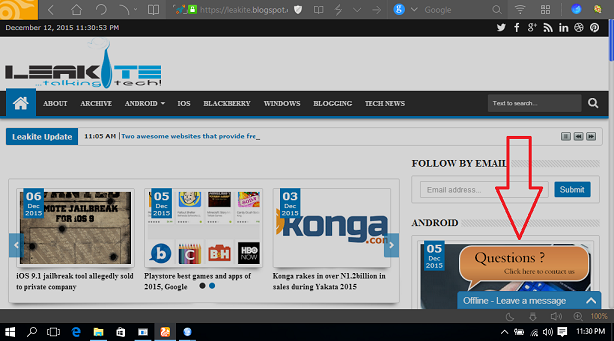
Now launch your blog. The live chat widget should be floated at the bottom-left of all your blog pages. See example below
This is pretty easy to do. But if do not have basic understanding of HTML, please backup your template first. Just in case you mess things up.
To add live chat widget to your blog, follow the guide below:
Step One: First, sign up at Mylivechat. Check your email and verify your account via the link sent in the email.
Step Two: Login to your Dashboard

Step Three: Click on Deployment tab (located at the left menu options), then select Embedded Chat.

Step Four: Copy all the code from the box shown in the screenshot above.
Step Five: Login to your blogger Dashboard > Templates > Edit HTML
Step Six: Search for </body> and add the code you copied before the </body> tag
Should then look like this...
<!--Add the following script at the bottom of the web page (immediately before the </body> tag)-->
<script type="text/javascript" async="async" defer="defer" data-cfasync="false" src="https://mylivechat.com/chatinline.aspx?hccid=xxxxxxxx"></script>
</body>
Note: XXXXXXX is your live chat ID.
Step 7: Save and exit.
Visit the downloads page to download the Windows, Android or iOS client. The web console does everything pretty cool though. Its your call!
Now launch your blog. The live chat widget should be floated at the bottom-left of all your blog pages. See example below

This is pretty easy to do. But if do not have basic understanding of HTML, please backup your template first. Just in case you mess things up.
Labels: blogging, live chat, mylivechat
posted by kjnb @ December 12, 2015
0 Comments


