Sunday, November 6, 2016

How To Crack/Unlock Any Android Phone Gesture Pattern Lock


Welcome back guys now in this tutorial am going to show you how to crack the guesture pattern lock of any android device without lose your files or your accounts, But this is for rooted device only.

This tutorial doesn't seem very effective in attacking some victim but it is good for those who want to try it on some android device after getting a metasploit meterpreter session.

How Gesture Pattern Lock Works??
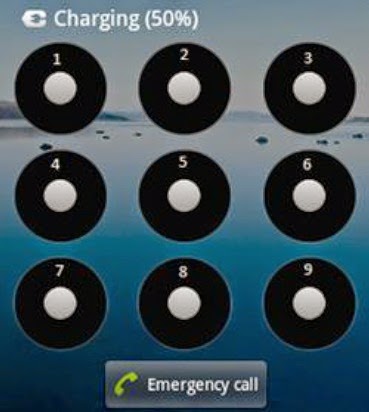
Well first of all we need to understand that how gesture pattern works. Patterns are nothing but the path traced by the fingers on the nine circles with
the number starting from 1 to 9 from top-left corner to the right bottom corner as shown in the figure below.
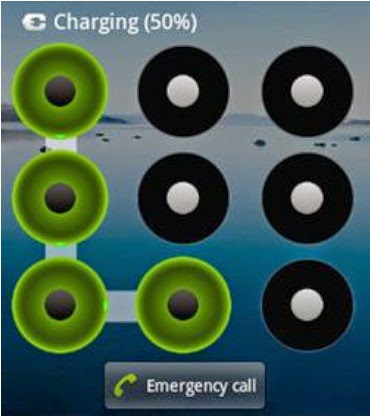
If we select a pattern 1478, the pattern would look like the following figure.

Gesture pattern is encrypted as a SHA-1 hash without a salt in gesture.key file at /data/system/ gesture.key .

Tools Required:
1- ADB shell
2- ROOTED android device
3- Gesture Pattern SHA-1 dictionary and script to compare those hashes

1- First of all, enable usb debugging in your mobile's settings and connect your cell phone with your pc so that we may copy the gesture.key file for decryption purpose.

2- Download ADB shell from ADB official site and extract it on your drive. Open cmd, go to adb folder and execute the following command.


3- Now download the Gesture Pattern SHA-1 dictionary and python script from the above given links and extract those on your drive. Then execute the following command.

From the above image you can see the decrypted Gesture Pattern which is 14569.

NOTE: This attack hardly takes 1-2 seconds as total number of possible patterns are only 9,85,825

That's All Stay Tuned To Get More Updates.......

Labels:

Sunday, October 30, 2016

[Unlocking] Yadda Zakayi Reseting Samsung Security Code Idan Ka Manata Ko Baka Saniba.

[Unlocking] Yadda Zakayi Reseting Samsung Security Code Idan Ka Manata Ko Baka Saniba.

Assalamu Alaikum Barkanmu Da Sake Haduwa Daku A Wannan Sabon Darasi Na Cire Security Na Wayar Samsung, Abokaina Kun Manta Security Code Din Samsung Dinku?

Karku damu ina da wasu codes na musan-man dominku, wanda zai baka damar reseting security na duk wata wayar samsung Ba Android Ba Amman Zai matukar tai maka muku idan har kun manta password din samsung,

Yawanci sai dai kuje wajan masu yin flashing kubiya kudin dasuka yanka muku, domin cireshi. Amman yanzu lokaci yayi dazaka iya-yi da kanka, wadan nan codes din, zaiyi reseting din duk wata waya kirar samsung.


Image Credit: gsmarena

WANNAN SHINE ABINDA ZAKUYI KAWAI
1. Na farko dai kashe wayarka
2. Na biyu Cire layinka daga cikin wayar
3. Na uku seka kunna wayar babu layi acikinta
4. Latsa wadan nan code din awaryar
*2767*637# (Zai canza saitin wayar)
5. Latsa wadan nan code in a wayarka *2767*3855# (Zai canza saitin wayarka yakuma coge komai na kan wayar).

CI-GABA
Kashe wayarka, cire layinka, sai kasake kunna ta, sai ka Latsa wadan nan ma dan nan *2767*782#, awayarka zata dauke seka jira kamar minti 2 ko 3,
Sai ka layinka ka kunna, jeka menu>>setting>>security>>phone lock , Sai Ka Canza Password Dinka Kasanya Wanda Kakeso.

Default, password dinka shine, 00000000 ko 0000,

Shikenan.
Amman duk kafin kayi wadan nan, ka tabbatar kayi kofi din komai na wayarka saboda zasu goge komai na cikin wayarka.
Karka karanta ka wuce bakayi comment ba.

Labels:

Friday, October 7, 2016

How To Reset Tecno Features Phone Password Without Knowing The Current Password

How To Reset Tecno Features Phone Password Without Knowing The Current Password.

Good News Now There's A Way To Reset All Tecno Features Phones Like Tecno, T340, T430,T463,T341,TV52 And All Others Tecno Features Phones, You Can Reset The Password, Without Knowing The Current Password, Or If Have Forget Your Password.

Just Follow The Procedures.
Press *#12345# Like The Image Bellow.

It Will Ask You Do You Want To Delete Your All Datas Like The Image Bellow.


Then Press Yes And Wait For A Moments, The Phone It'll Automaticaly Reboot, Now Your Password Has Been Successfully Reseted You Can The Default Password: 1234

.

Labels: