Wednesday, November 9, 2016

how to flash Cherry Mobile Flare XL PLUS stock rom VIA SPFT

Cherry Mobile Flare XL Plus Stockrom PIcture

Requirements:

  • WinRAR
  • SPFT 5.1628
  • FXL+ Stock ROM v06
  • VCOM or CDC Driver
  • PC and FXL+
Links

FXL+ Stock ROM v06


Drivers

Procedure:

  1. Install WinRAR
  2. Extract/Combine the 4 rom files using WinRAR on pc
  3. Extract CDC/VCOM Driver
  4. Extract SPFT 5.1628
  5. Install driver CDC or VCOM (if CDC doesnt work then install VCOM or vice-versa)
  6. Turn off the smartphone. (Cable is not connected to the computer)
  7. Remove the battery and insert it again
  8. Connect your phone to a "stable data cable". The operating system detects a new device
  9. Disconnect the cable from the computer.
  10. Open "Flash_tool.exe"
  11. Once SPFT is launched, Click on the "Download" tab
  12. Click "Scatter-loading" and select the "MT6592_Android_scatter.txt" file (on the DATABASE folder).
  13. Click "Download".
  14. Now, Connect your phone to pc using a "stable data cable" (without battery), then while pressing "volume down", insert the battery, so the pc will easily detect your phone
  15. Once Flashing is completed, a "Green Circle with Check" will appear.
  16. Completed.

Labels: , , , ,

Monday, November 7, 2016

TUTORIAL HOW TO FLASH CHERRY MOBILE INFINIX XL STOCK ROM

Cherry Mobile Infinix Stockrom Picture 1
hello so in this tutorial i will teach how to flash a cherry mobile infinix pure XL via SPFT and Custom recovery tools :D

requirments (PC version)
PC
The phone
cord

Download the following
[MT65xx-USB-Driver##download##]
[MT6577 USB VCOM Drivers##download##]

SPFT FLASH TOOL
[SPFT FLASH TOOL##download##]

Stock Rom
[stockrom##download##]

                                  We are not responsible if anything happens to your phone.

Step by Step Tutorial Fo Flashing Stock Rom(Original Firmware) Using Sp Flash Tool:

*This can fix bootloop
*Phone lagness
*Making back the Original Rom

1. Ready your cable and phone. Must have atleast 70% charge. Phone must be turned off.
2. All of the files are in zip file, so you need to extract them all.Better if you will make one folder for your files then extract it.
3. Enable USB Debugging mode in your phone.
4. Install all MT65xx-USB-Driver
5.Install  USB VCOM Drivers
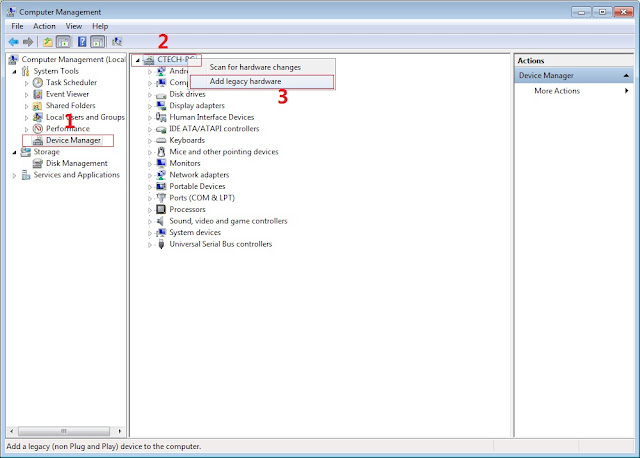
 In Device Manager Right click on PC name(Right Side) and then click on Add legacy hardware as shown in image below.

Now in Add Hardware Wizard click on Next » Install the Hardware that i manually select from a list (Advanced) » Show All Devices » Next » Have a Disk, Now select the any inf file from where you extracted the downloaded VCOM driver package.
Now Click on Next and select Install this driver software anyway and wait for finishing the process.
4.  After installation is finished then Restart your computer, That's it.
5. Open Flash tool click on the Download Tab
 Extract the downloaded Cherry mobile infinix XL stock rom to the new folder you created.
(NOTE: I'm using other screenshots of other phone since I don't have that device though the process is still the same so no worries).

6. Click Scatter-loading and browse for the scatter file (MT6575_Android_scatter)
7. For Bootloop only
 Make sure flashing mode is set to "Download Only" and check mark all except Preloader.
Note: If deadboot/hardbrick set "Download+Format" and check Preloader.
8. Click Download.


9. Turn off your phone, connect your phone to the PC and wait for the flashing to commence.

10. Green Circle image with check will show once flashing is completed. That's it!

11. Disconnect your phone in USB cord then open if still bootloop then try to factory reset in recovery settings. To go in recovery mode reboot your phone hold and press power on and volume up simultaneously until recovery mode appeared.


Labels: , , ,

Friday, September 30, 2016

How to fix bootloop in Cherry Mobile Cubix Cube 3 with Stock Rom flash via SPFT

How to fix bootloop in Cherry Mobile Cubix Cube 3 with Stock Rom flash via SPFT
This tutorial help you oh how to fix bootloop and hardbrick in Cubix Cube 3.

Cubix Cube 3 Stockrom


Requirements:
PC
USB Cable

Download Links:
Mediatek VCOM Drivers
Cubix Cube 3


 Instructions
1. Download all necessary files and Enable USB Debugging mode in your phone..
2. Install Drivers USB_VCOM_Driver.rar
In Device Manager Right click on PC name(Right Side) and then click on Add legacy hardware as shown in image below.

Driver Installation
Now in Add Hardware Wizard click on Next » Install the Hardware that i manually select from a list (Advanced) » Show All Devices » Next » Have a Disk, Now select the any inf file from where you extracted the downloaded VCOM driver package.

Driver Installtion 2

3.  Now Click on Next and select Install this driver software anyway and wait for finishing the process.

Driver Installation 3

4.  After installation is finished then Restart your computer, That's it.
5. Open flash_tool.exe, click on the Download Tab
 Extract the downloaded Cubix Cube 3 stock rom to the new folder you created.
Driver Installation 4

6. Click Scatter-loading and browse for the scatter file (MT6753_Android_scatter)
7. For Bootloop only
 Make sure flashing mode is set to "Download Only" and check mark all except Preloader.
Note: If deadboot/hardbrick set "Download+Format" and check Preloader.
8. Click Download.
SPFT Download

9. Turn off your phone, connect your phone to the PC and wait for the flashing to commence.
10. Green Circle image with check will show once flashing is completed. That's it!

SPFT Success

11. Disconnect your phone in USB cord then open if still bootloop then try to factory reset in recovery settings. To go in recovery mode reboot your phone hold and press power on and volume up simultaneously until recovery mode appeared.
Credits:
Cubix Cube 3 Official Group

Labels: , , ,

Thursday, September 29, 2016

How to fix bootloop in Cherry Mobile Flare S4 Max via SPFT

How to fix bootloop in Cherry Mobile Flare S4 Max included Stock Rom flash via SPFT
This tutorial is able to help you oh how to fix bootloop and hardbrick in Flare S4 Max.
In case you don't have backup and installed custom recovery you can proceed in this procedure.

ow to fix bootloop in Cherry Mobile Flare S4 Max


Requirements:
PC
USB Cable

Download Links:
Mediatek VCOM Drivers
Flare S4 Max Stock rom(v2.9 lollipop)


 Instructions
1. Download all necessary files and Enable USB Debugging mode in your phone..
2. Install Drivers USB_VCOM_Driver.rar
In Device Manager Right click on PC name(Right Side) and then click on Add legacy hardware as shown in image below.

Driver Installation
Now in Add Hardware Wizard click on Next » Install the Hardware that i manually select from a list (Advanced) » Show All Devices » Next » Have a Disk, Now select the any inf file from where you extracted the downloaded VCOM driver package.

Driver Installtion 2

3.  Now Click on Next and select Install this driver software anyway and wait for finishing the process.

Driver Installation 3

4.  After installation is finished then Restart your computer, That's it.
5. Open flash_tool.exe, click on the Download Tab
 Extract the downloaded Flare S4 Max stock rom to the new folder you created.
Driver Installation 4

6. Click Scatter-loading and browse for the scatter file (MT6753_Android_scatter)
7. For Bootloop only
 Make sure flashing mode is set to "Download Only" and check mark all except Preloader.
Note: If deadboot/hardbrick set "Download+Format" and check Preloader.
8. Click Download.
SPFT Download

9. Turn off your phone, connect your phone to the PC and wait for the flashing to commence.
10. Green Circle image with check will show once flashing is completed. That's it!

SPFT Success

11. Disconnect your phone in USB cord then open if still bootloop then try to factory reset in recovery settings. To go in recovery mode reboot your phone hold and press power on and volume up simultaneously until recovery mode appeared.
Credits:
Socrates of Needrom

Labels: , , , ,

Sunday, June 5, 2016

How to fix bootloop CherryMobile Flare Play S

CherryMobile Flare S Play Stock Rom V05 & V06

Cherry Mobile Flare S Play Stockrom

This tutorial teach you on how to fix bootloop for Flare S Play but you need TWRP
recovery to flash this Stockrom V05 & V06.

Requirements:
-Rooted Phone
-With TWRP installed

Procedure:
-Extract the file
-Put the file in the folder of your SD card or Internal Sd
-Inside the TWRP folder create a folder Backup or Backup you Rom In Recovery and abort to create a destination folder
-Reboot into recovery (TWRP) select restore backup from internal or sd card.wait for the process to complete.
What’s in the Rom:
Root Ready (KingRoot)
Restore Using Custom Recovery via Restore
[UPDATED!!!]
Version 6 Rom
Download here: Click Here
Decryption Key: !wkQWKrZo58Y8ZB-BHn1RZ6pN2jJetdCdL5PLM4WusaY

After restore you might experience “unknown baseband” e.g. Invalid Imei
Try to do this method:
1. Rooted your MTK Android phone
2. Download and install Mobile Uncle Tools from Google play store.
3. Go to Engineer Mode and Select Engineer mode (MTK)
4. Go to Connectivity Tab and Select CDS information
5. Select Radio Information after that Select Phone1 (for the first IMEI)
6. At the top there is a command line which begins “AT+” just type there “AT +EGMR=1,7,”IMEI_1? (Put your first IMEI number number)
7. Hit send command and you will / may get a confirmation that "sent to mSend".
8. Now go back and select “Phone2? (for the second IMEI number)
9. At the top there is a command line which begins “AT+” just type there “AT +EGMR=1,10,”IMEI_2? (Put your second IMEI number)
10. Reboot your phone and check you IMEI number (Dial *#06#).

Special thanks:
NEAD SICNARF ONAAMID

Lord Alzer Tinampay Casiño

Labels: , , ,

Monday, May 16, 2016

How to fix bootloop Myphone My36 via Wiko Fever Firmware

How to fix bootloop Myphone My36 via Wiko Fever Firmware


This tutorial teach you on how to fix bootloop and deadboot for Myphone My36. Since we still no available stockrom for My36 we will use Wiko Fever firmware which OTA of this phone. This already tested of our members. To flash this firmware you need to download all needed requirements. Just follow my instructions carefully.
How to fix bootloop Myphone My36


Requirements:
WIKO FEVER STOCKROM
PC/LAPTOP(WINDOWS OS)
USB CABLE
PHONE


FOR WINDOWS XP/7 -INSTALLING DRIVERS
1. Download Mediatek Driver and Extract then Install the driver for 32 or 64 bit operating system of windows 7.
Driver Choose 32 or 64 bit
2.  Before you plug your phone in PC, you need to focus in Device Manager, then plug your phone without the battery you only have approximately 5 seconds to appear MT65xx device that shows under Other devices, you need to right click it as soon as you see it.
MTK USB PORT

Then after you rightclick, click to Update driver software

3. Then choose - Browse my computer for driver software
Browse Driver

Browse the Mediatek MT65xx Preloader Driver folder

Make sure you know the version of OS to choose the right driver for your PC.

Choose your OS version, then choose if 32-bit or 64-bit for your PC.

E.G. s Win7  folder:
usb2ser_Win7.inf - if 32-bit
usb2ser_Win764.inf - if 64-bit

4. Another options, to find right driver for your phone is to open your internet while your phone is connected without the battery and automatically searching driver for your phone.

FOR WINDOWS 8/8.1/10 -INSTALLING DRIVERS
1. Download all necessary files and Enable USB Debugging mode in your phone..
2. Install Drivers USB_VCOM_Driver.rar
In Device Manager Right click on PC name(Right Side) and then click on Add legacy hardware as shown in image below.

add legacy
Now in Add Hardware Wizard click on Next » Install the Hardware that i manually select from a list (Advanced) » Show All Devices » Next » Have a Disk, Now select the any inf file from where you extracted the downloaded VCOM driver package.

mediatek preloader

3.  Now Click on Next and select Install this driver software anyway and wait for finishing the process.

Install driver anyway

4.  After installation is finished then Restart your computer, That's it.
If still not success in installing driver just Disabled Driver Signature Verification
1. Go to PC Settings>General>Troubleshoot>Advanced Options>Startup Settings>Disabled Driver Signature Enforcement>Then Restart
disabled driver signature verification
Once you disabled. Then follow the procedure above to install the driver. Once success proceed to next step.
5. Download SP_Flash_Tool_v5.1352.01.rar and extract then click flash_ tool to open
Click Flash tool

6. Click Scatter_loading and open your scatter file like image below(I'm using mt6572 scatter File)

Click Scatter Loading


7. Check all except preloader. (If your device is hardbrick/deadboot apply check in preloader)

Uncheck Preloader


8. Click download
Click Download


9. Wait until green circle appear

SPFT SUCCESS GREEN CIRCLE


Remove your phone to usb cable then insert your battery and On your android phone..Enjoy!

Note: If not reboot try factory reset in recovery mode of your phone.

Labels: , , , ,