Wednesday, December 14, 2016

Cherry Mobile Flare S5 Power Specs and Review

            
Cherry Mobile Flare S5 Picture 1

               Cherry Mobile Flare S5 Power

Among the new handset cherry mobile just announced, one of them is made to last a full charge than your typical smartphone. With a 6050mAh battery built in, it posses it self to be a road warrior's companion, Here are our first impression of Flare s5 Power.
Cherry Mobile Flare S5 Picture 2
The Flare s5 Power shares the most common characteristics with the rest of the series with its 5.5-inches display but with an LTPS Panel. It has a full HD resolution which is higher than competing large-phone batteries with lower 720p panels. A 5Mp front-facing camera is positioned above the display
Cherry Mobile Flare S5 Picture 3
The frame of the handset is made out of aluminum and the comfortable feeling in the hands give the Flare s5 Power a premium touch . the volume rocker and the power lock button on the right side with an additional key button for the camera it leaves the phone easy and comfortable to use anywhere
Cherry Mobile Flare S5 Picture 3
                The 3.5mm headphone jack and an IR blaster are both located at the top of the phone
Cherry Mobile Flare S5 Picture 4
The bottom end is the home of the microUSB port for charging and wired connectivity plus the microphone. A couple of antenna bands are also found here.
Cherry Mobile Flare S5 Picture 5
The back panel is non removable thus protect the battery for any further damage. The main camera is 13mp with a dual led flash to help in low-light scenarios perfect for picture taking the speaker is also located at the lower end panel
Cherry Mobile Flare S5 Picture 6
The handset is powered by a 1.3GHz MediaTek 6753 octa-core processor with a Mali-T720 GPU. Memory is at 3GB while storage is 16GB, but expandable via a microSD card up to 64GB. It’s got LTE Band 28 or more popular known as the 700MHz onboard to take advantage of the new frequency used by telcos.
Cherry Mobile Flare S5 Picture 7
Performance has been generally good but the main feature should be the battery life. We can’t tell how long exactly this phone will last on a single charge yet, but we estimate that it can last for more than a day. In addition, it also supports fast-charging with a fast charger included in the package.

Cherry Mobile Flare S5 Power specs:
5.5-inch LTPS LCD @ 1920 x 1080 pixels
1.3GHz MediaTek 6753 octa-core processor
Mali T720 GPU
3GB RAM
16GB internal storage
Expandable via microSD, up to 64GB
16-megapixel BSI PDAF rear camera w/ LED flash
5-megapixel front camera
Dual SIM
4G LTE
Wi-Fi 802.11ab/g/n
Bluetooth 4.0
Light Sensor, Proximity Sensor, G-Sensor
Fingerprint Sensor
GPS w/ A-GPS
6050mAh removable battery
Android 6.0 Marshmallow


Labels: , ,

Saturday, November 19, 2016

how to flash Cherry Mobile Omega HD 3 stock rom via PAC file

Cherry Mobile Omega HD

Part One: Installing drivers
1. Extract the driver file.
2. Run dpinst.exe . Note that "x86" folder is for 32-bit computer while "amd64" is for 64-bit computer
3. We have to verify if the driver is installed, right-click on My Computer(WinXP)/Computer(Win7)/This PC(Win8) then Manage>Device Manager
4. Turn off your phone and remove the battery then insert back the battery again.
5. We have to first detect the phone to PC if its driver is working. Plug in the micro USB cord to your phone first but don't connect the USB cord to PC itself.
6. Timing is important! Hold volume down then immediately plug in the USB cord to your PC.
7. A poped-up notification appear to show if the drivers are successfully installed.
8. You may now remove the USB cord to the PC if success but don't remove yet the micro USB cord to your phone.
9. Now, we are ready to use Research Download!
Part Two: Using Research Download
1. Extract Research Download file
2. Extract your downloaded stock ROM file
3. Run ResearchDownload.exe
4. Click the first gear button. This will open up a browse menu. Use this to locate your .PAC file then click "Open" button.
5. Once the PAC file is loaded click play button .
6.Connect your Omega HD3 (while holding volume down)
7.You should see in research download that it has started flashing! (you can let go of the volume key now). When it is finished just press the stop button and disconnect your phone!
Additional:
* After the first boot of your phone, your current internal storage is xxxGB. Before doing anything else like rooting, installing or flashing recoveries, go to Settings>Factory data reset>Factory data reset then tap Reset Phone then tap Erase everything. Your phone will reboot to recovery. Wait for erasing and it reboot automatically. After that, your internal storage restore to its default size

Links:
Final Firmware For Omega HD 3  V1 By Team YuniX [MIUI Recovery Recomended] If You are Using this Firmware, Don’t Use The Firmware Below Thanks :D
[Click me!##download##]

Final Firmware For Omega HD 3 By Team YuniX [TWRP Recovery For V1 Users]

[Click me!##download##]

Spreadtrum Drivers

[Click me!##download##]

Research Download

[Click me!##download##]

ATTENTION!! THIS IS REQUIRED!!!
Download the MIUI Recovery PAC File and Flash it also after Flashing this Firmware and “ Boot to MIUI Recovery do a Wipe/Factory Reset” done :) Your Internal Storage is now Fixed :D

Labels: , , , , , , , , , ,

how to flash Cherry Mobile Omega HD 3 stock rom via twrp

Cherry mobile omega


Download link
[Stock Rom##download##]

Steps
*Turn off your device.
*Press power botton + volume up (sabay)
Select
*wipe and format options
-factory reset
-wipe cache
-wipe dalvik/art cache
*Install zip from sd
Select and install...
After installing
Go back to
*wipe and format options
-wipe cache
-wipe dalvik/art cache
Then Reboot..

Labels: , , , , , , ,

how to flash Cherry mobile flare lite stock rom v1 via custom recovery

Cherry mobile flare cosmos force


[Stock rom(download the backups.zip)##download##]

*Turn off your device.
*Press power botton + volume up (sabay)
Select
*wipe and format options
-factory reset
-wipe cache
-wipe dalvik/art cache
*Install zip from sd
Select and install...
After installing
Go back to
*wipe and format options
-wipe cache
-wipe dalvik/art cache
Then Reboot..

Labels: , , , , , , ,

Sunday, November 13, 2016

How to flash cherry mobile flare j1 mini stock rom via SPD


Cherry Mobile Flare J1 Picture
requirements:
1.[FLASH TOOL##download##]
2.[SPD DRIVER##download##]
3.[Stock rom ##download##]

password:GSM_mazzamok
INSTRUCTIONS: 1. DOWNLOAD MO LAHAT NG NASA LINKS. 2. INSTALL USB DRIVERS AYON SA VERSION NG PC MO. 3.EXTRACT MO YUNG PAC FILES, KAHIT SAAN YUNG MADALI MONG MAKITA. 4.OPEN FLASHTOOL, CLICK MO YUNG GEAR NA ICON. HANAPIN MO YUNG PAC FILE. 5. TANGALIN MUNA BATTERY THEN BALIK ULIT, CLICK VOLUME DOWN, INSERT USB CABLE. 6. TAPOS CLICK MO YUNG ARROW SA FLASHTOOL. 7. WAIT TO DOWNLOAD ALL FILES. 8.DONE FLASHING!!!

Labels: , , , , ,

Friday, November 11, 2016

[Rom]Amigo os 3.1.8 for cm flare 4 by jasc

[Rom]Amigo os 3.1.8 for cm flare 4 by jasc

[Rom]Amigo os 3.1.8 for cm flare 4 by jasc Screenshot

[Rom]Amigo os 3.1.8 for cm flare 4 by jasc Screenshot


Latest Amigo ui v3.1 based on Lollipop 5.1 
Smooth UI with Brand new look
Inbuilt theme / icon packs / online themes
Awesome Wallpapers
Cool lock screen / notification / quick settings
Move to SD Card support
Rooted with latest SuperSU
Init.d scripts support
Improved touch response
Multi-language Support
Add Multilanguage Support
Add Gapps
Rooted with latest SuperSU
Init.d scripts support
Improved touch response
Inbuilt theme / icon packs / online themes
Awesome Wallpapers
Cool lock screen / notification / quick settings
AND MORE

INSTALLATION: 
Download the ROM from the link above
Put the zip files on your SDCard
Reboot in Recovery
Perform Wipe All Preflash
Select "Install zip from SDCard"
Choose ROM zip file
Flash
Wipe Cache & Dalvik Cache
Reboot system​ 

BUG:
Flashlight toggle button not work but you can use any 3rd app from market 


Credits: 
KNIGHT OWLS PORTING ASSASSINS (KOPA)
Mad skill skill
Janric vicedo
Jasc

Labels: , , , , , ,

Wednesday, November 9, 2016

how to flash Cherry Mobile Flare XL PLUS stock rom VIA SPFT

Cherry Mobile Flare XL Plus Stockrom PIcture

Requirements:

  • WinRAR
  • SPFT 5.1628
  • FXL+ Stock ROM v06
  • VCOM or CDC Driver
  • PC and FXL+
Links

FXL+ Stock ROM v06


Drivers

Procedure:

  1. Install WinRAR
  2. Extract/Combine the 4 rom files using WinRAR on pc
  3. Extract CDC/VCOM Driver
  4. Extract SPFT 5.1628
  5. Install driver CDC or VCOM (if CDC doesnt work then install VCOM or vice-versa)
  6. Turn off the smartphone. (Cable is not connected to the computer)
  7. Remove the battery and insert it again
  8. Connect your phone to a "stable data cable". The operating system detects a new device
  9. Disconnect the cable from the computer.
  10. Open "Flash_tool.exe"
  11. Once SPFT is launched, Click on the "Download" tab
  12. Click "Scatter-loading" and select the "MT6592_Android_scatter.txt" file (on the DATABASE folder).
  13. Click "Download".
  14. Now, Connect your phone to pc using a "stable data cable" (without battery), then while pressing "volume down", insert the battery, so the pc will easily detect your phone
  15. Once Flashing is completed, a "Green Circle with Check" will appear.
  16. Completed.

Labels: , , , ,

Monday, November 7, 2016

How to flash Cherry mobile infinix XL stock rom via Custom recovery

Cherry mobile infinix XL stock rom picture
Hello guys today i will teach how to fix Cherry mobile infinix Xl stock rom via Custom recovery

Requirments
[StockRom##download##]
[CWM##download##](unchecked the shield and download)

  1. Reboot to Recovery (CWM/TWRP) (Press the Volume Up and Power button simultaneously)
  2. Wipe Data/factory reset, Wipe Cache Partition, Wipe Dalvik Cache.
  3. Install Zip from SD card
  4. Choose Zip from SD card
  5. Choose "[IP]StockRomV08.zip
  6. Install
  7. Wait
  8. Reboot system now

Labels: , , ,

TUTORIAL HOW TO FLASH CHERRY MOBILE INFINIX XL STOCK ROM

Cherry Mobile Infinix Stockrom Picture 1
hello so in this tutorial i will teach how to flash a cherry mobile infinix pure XL via SPFT and Custom recovery tools :D

requirments (PC version)
PC
The phone
cord

Download the following
[MT65xx-USB-Driver##download##]
[MT6577 USB VCOM Drivers##download##]

SPFT FLASH TOOL
[SPFT FLASH TOOL##download##]

Stock Rom
[stockrom##download##]

                                  We are not responsible if anything happens to your phone.

Step by Step Tutorial Fo Flashing Stock Rom(Original Firmware) Using Sp Flash Tool:

*This can fix bootloop
*Phone lagness
*Making back the Original Rom

1. Ready your cable and phone. Must have atleast 70% charge. Phone must be turned off.
2. All of the files are in zip file, so you need to extract them all.Better if you will make one folder for your files then extract it.
3. Enable USB Debugging mode in your phone.
4. Install all MT65xx-USB-Driver
5.Install  USB VCOM Drivers
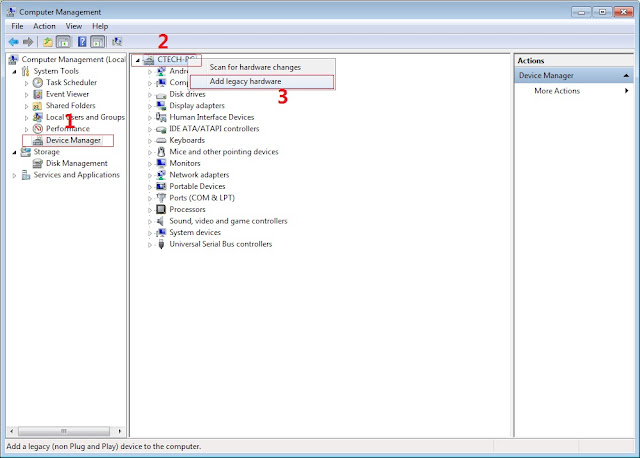
 In Device Manager Right click on PC name(Right Side) and then click on Add legacy hardware as shown in image below.

Now in Add Hardware Wizard click on Next » Install the Hardware that i manually select from a list (Advanced) » Show All Devices » Next » Have a Disk, Now select the any inf file from where you extracted the downloaded VCOM driver package.
Now Click on Next and select Install this driver software anyway and wait for finishing the process.
4.  After installation is finished then Restart your computer, That's it.
5. Open Flash tool click on the Download Tab
 Extract the downloaded Cherry mobile infinix XL stock rom to the new folder you created.
(NOTE: I'm using other screenshots of other phone since I don't have that device though the process is still the same so no worries).

6. Click Scatter-loading and browse for the scatter file (MT6575_Android_scatter)
7. For Bootloop only
 Make sure flashing mode is set to "Download Only" and check mark all except Preloader.
Note: If deadboot/hardbrick set "Download+Format" and check Preloader.
8. Click Download.


9. Turn off your phone, connect your phone to the PC and wait for the flashing to commence.

10. Green Circle image with check will show once flashing is completed. That's it!

11. Disconnect your phone in USB cord then open if still bootloop then try to factory reset in recovery settings. To go in recovery mode reboot your phone hold and press power on and volume up simultaneously until recovery mode appeared.


Labels: , , ,

Sunday, November 6, 2016

[ROM]Miui v8 6.10.20 MultiRom For Cubix Cube 3 mt6753 by Mil Herson

[ROM]Miui v8 6.10.20 MultiRom For Cubix Cube 3 mt6753 by Mil Herson

[ROM]Miui v8 6.10.20 MultiRom For Cubix Cube 3 mt6753 by Mil Herson Screenshot

[ROM]Miui v8 6.10.20 MultiRom For Cubix Cube 3 mt6753 by Mil Herson Screenshot


CHANGES IN DETAIL VERSION 6:10:20


MESSAGE
New - Design cards for authentication notification message (10-19) 

APPS MIUI FORUM
Optimization - Speed ​​of application (10-19) 

SYSTEM
Optimization - Improved system stability (10-19) 

Before You Flash This Rom Make A BuckUp Of Your Current Rom ... 

Fix
Video Recording For Stock Camera
Hdr in Camera
Second Space 

Bugs:
??? 

This Rom Is Stable And Bugless 

Installation Procedure 

TWRP Recovery
Clear
System
Data
Flash Miui 6.10.20 

DOWNLOAD:

Link: [KOPA_Miui_v8_6.10.20_MultiRom ##download##]

To use Xmiui Just go to playstore type xmiui then update the xmiui ... Now u can use xmiui for editing statusbar.

Credits
Patrick Milher Magsino
Yow Bushkie
Aysus Wenceslao
Victor Concepcion
Knight Owls Porting Assassins
Miui
Redmi Note Rice 2
Mt6795
A.M.T

Labels: , , , , , , , , ,

Saturday, November 5, 2016

Flare S5 Power | Quick Review


Front and Back View Image 1

Quick Review

Flare S5 Power is Design after his Brothers Flare S5, but the BIG difference is S5 Power has 6050mAh Power Battery which can last longer than his Elder Brother. S5 Power is heavier than S5 Plus and the Other S5 because of the Massive Big Battery inside his body.

The frame of the phone is still metal, though the phone gains a third button on the right side of the phone aside from the power and volume rocker.

Flare S5 Power Specifications

Battery
6050mAh Non Removable 
SIM
Dual (Micro + Nano) 
Display
5.5" FHD LTPS Screen 
Front Camera
5MP 
Rear Camera
13MP BSI 
Memory
16GB ROM 
Network
4G 
Connectivity
Wifi b/g/n Bluetooth 4.0 
RAM
3GB 
Processor
64-bit Octa Core 
Operating System
Marshmallow 6.0 
GPU
Mali T720 
Others Features
6050mAh Big Battery, Fingerprint Sensor 

Flare S5 Power Features

Marshmallow 6.0

1.3GHz Octa-Core
13MP BSI Rear & 5MP Front
16GB ROM | 3GB RAM
Micro SD up to 64GB
6050mAH Big Battery
LTE Ready
Fingerprint Sensor

Labels: , ,

Friday, October 21, 2016

[Rom] Miui v8 6.10.13 China Developer Rom Blind Ported For Flare 4 By Yow Bushkie


[Rom] Miui v8 6.10.13 China Developer Rom Blind Ported For Flare 4 By Yow Bushkie Screenshot


MIUI 8 China Developer ROM 6.10.13 Full Changelog


Highlights
New - Added 'Copy' buttons for message items in the Notification shade (10-11)
New - Added automated tasks in Security (10-13)
New - Carrier info on the call screen (10-11)
Optimization - Extended time for floating notifications about verification messages (10-09)
Optimization - A switch in the settings for showing only quick notes (10-10)

Phone
New - Carrier info on the call screen (10-12)

Messaging
New - Added "Copy" buttons for message items in the Notification shade (10-11)
Optimization - Extended time for floating notifications about verification messages (10-09)

Home screen
Fix - Part of UI for deleting apps wasn't visible on light backgrounds (10-11)

Camera
Fix - Face frame appeared when recording video in some cases (10-11)

Settings
Optimization - Set start and end time for Read mode even when it's off (10-10)
Optimization - Separate App lock from Privacy protection password (10-12)
Fix - Music could be activated only in the Settings in some cases (10-11)

Calendar
Optimization - Bigger fonts in month view (10-11)
Optimization - Holidays are marked in a more obvious way in the month view (10-11)

Notes
Optimization - A switch in the settings for showing only quick notes (10-11)

Security
New - Added automated tasks in Security (10-11)

[ROM]
[Miui_v8_6.10.13 ##download##]

CREDITS
Yow Bushkie
Aysus Wenceslao
Victor Concepcion
Miui
Redmi Rice Note 2
A.M.T

Labels: , , , , , ,

Tuesday, October 18, 2016

Cherry Mobile Flare Infinity is now available in the Philippines' market

Cherry Mobile Flare Infinity

Being the top local phone brand, Cherry Mobile officially announced and released the Cherry Mobile Flare Infinity.

This smartphone will surely amaze everyone because of its high-tech features and specs.

This phone has a curved sides and rounded corners. Hybrid SIM and microSD slot are located at the left side of the phone, while the right side contains the volume and power button and the fingerprint scanner.

Cherry Mobile Flare Infinity Sample Picture


Cherry Mobile Flare Infinity specs

  • Android 6.0 (Marshmallow)
  • Dual sim
  • 5.5 inch screen, 1920 x 1080 pixel resolution
  • 2.0GHz MediaTek MT6755 Helio P10 octa-core processor
  • 4GB RAM
  • 32GB internal strorage (up top 64GB)
  • 16 megapixel (rear) / 5 megapixel (front)
  • G-sensor, Proximity, Light and Fingerprint sensor
  • 3000mAh non removable battery

Cherry Mobile Flare Infinity Closer Picture

Cherry Mobile Flare Infinity's price starts at ₱12,999

Labels: , ,

Cherry Mobile announced Cherry Mobile FLare X2 for only P7,999


Cherry Mobile Flare X2 Picture

Cherry Mobile has officially announced a new smartphone that has great features that you will fall in love because of it's amazing specs on it's low price.
This is the evolution of Flare X that was successful last year and so called Cherry Mobile Flare X2 is built up with most stable and updated OS which runs on Android 6.0 or Marshmallow. Combination with its simple style, but build with incredible specifications. A 16MP BSI PDAF Rear w/ LED Flash and 8mp front camera reason to fall in love in selfie.

With it's high performance processor 1.4GHz Octa Core 64bit
Qualcomm Snapdragon 430 MSM8937 Chipset and Adreno 505 GPU that was perfect for gaming.
Built with 4GB RAM that play smoothly and runs faster that you expected.

It also capable for high speed internet inside 4G and LTE. You can play video without buffering and download without hassle.

Also known as "All glass Scratch Resistance" because of Dragontrail Glass Front and Back Protection.


Cherry Mobile Flare X2 Specs:

  • Android 6.0 Marshmallow
  • 5.5" FHD IPS Screen w/ Dragontrail Glass Front and Back Protection, 401ppi
  • 1.4GHz Octa Core 64bit
  • Qualcomm Snapdragon 430 MSM8937 Chipset
  • Adreno 505 GPU
  • 32GB ROM (micro SD up to 64GB)
  • 4GB RAM
  • 16MP BSI PDAF Rear w/ LED Flash + 8MP Front Camera
  • 4G LTE, 3G HSPA+, WiFi, BT 4.0
  • Dual Hybrid Sim (Micro-Nano)
  • Fingerprint Scanner
  • 3,000mAh Battery (Non-Removable)
  • SRP PHP 7,999

Labels: , , ,

Friday, September 30, 2016

How to fix bootloop in Cherry Mobile Cubix Cube 3 with Stock Rom flash via SPFT

How to fix bootloop in Cherry Mobile Cubix Cube 3 with Stock Rom flash via SPFT
This tutorial help you oh how to fix bootloop and hardbrick in Cubix Cube 3.

Cubix Cube 3 Stockrom


Requirements:
PC
USB Cable

Download Links:
Mediatek VCOM Drivers
Cubix Cube 3


 Instructions
1. Download all necessary files and Enable USB Debugging mode in your phone..
2. Install Drivers USB_VCOM_Driver.rar
In Device Manager Right click on PC name(Right Side) and then click on Add legacy hardware as shown in image below.

Driver Installation
Now in Add Hardware Wizard click on Next » Install the Hardware that i manually select from a list (Advanced) » Show All Devices » Next » Have a Disk, Now select the any inf file from where you extracted the downloaded VCOM driver package.

Driver Installtion 2

3.  Now Click on Next and select Install this driver software anyway and wait for finishing the process.

Driver Installation 3

4.  After installation is finished then Restart your computer, That's it.
5. Open flash_tool.exe, click on the Download Tab
 Extract the downloaded Cubix Cube 3 stock rom to the new folder you created.
Driver Installation 4

6. Click Scatter-loading and browse for the scatter file (MT6753_Android_scatter)
7. For Bootloop only
 Make sure flashing mode is set to "Download Only" and check mark all except Preloader.
Note: If deadboot/hardbrick set "Download+Format" and check Preloader.
8. Click Download.
SPFT Download

9. Turn off your phone, connect your phone to the PC and wait for the flashing to commence.
10. Green Circle image with check will show once flashing is completed. That's it!

SPFT Success

11. Disconnect your phone in USB cord then open if still bootloop then try to factory reset in recovery settings. To go in recovery mode reboot your phone hold and press power on and volume up simultaneously until recovery mode appeared.
Credits:
Cubix Cube 3 Official Group

Labels: , , ,

Thursday, September 29, 2016

How to fix bootloop in Cherry Mobile Flare S4 Max via SPFT

How to fix bootloop in Cherry Mobile Flare S4 Max included Stock Rom flash via SPFT
This tutorial is able to help you oh how to fix bootloop and hardbrick in Flare S4 Max.
In case you don't have backup and installed custom recovery you can proceed in this procedure.

ow to fix bootloop in Cherry Mobile Flare S4 Max


Requirements:
PC
USB Cable

Download Links:
Mediatek VCOM Drivers
Flare S4 Max Stock rom(v2.9 lollipop)


 Instructions
1. Download all necessary files and Enable USB Debugging mode in your phone..
2. Install Drivers USB_VCOM_Driver.rar
In Device Manager Right click on PC name(Right Side) and then click on Add legacy hardware as shown in image below.

Driver Installation
Now in Add Hardware Wizard click on Next » Install the Hardware that i manually select from a list (Advanced) » Show All Devices » Next » Have a Disk, Now select the any inf file from where you extracted the downloaded VCOM driver package.

Driver Installtion 2

3.  Now Click on Next and select Install this driver software anyway and wait for finishing the process.

Driver Installation 3

4.  After installation is finished then Restart your computer, That's it.
5. Open flash_tool.exe, click on the Download Tab
 Extract the downloaded Flare S4 Max stock rom to the new folder you created.
Driver Installation 4

6. Click Scatter-loading and browse for the scatter file (MT6753_Android_scatter)
7. For Bootloop only
 Make sure flashing mode is set to "Download Only" and check mark all except Preloader.
Note: If deadboot/hardbrick set "Download+Format" and check Preloader.
8. Click Download.
SPFT Download

9. Turn off your phone, connect your phone to the PC and wait for the flashing to commence.
10. Green Circle image with check will show once flashing is completed. That's it!

SPFT Success

11. Disconnect your phone in USB cord then open if still bootloop then try to factory reset in recovery settings. To go in recovery mode reboot your phone hold and press power on and volume up simultaneously until recovery mode appeared.
Credits:
Socrates of Needrom

Labels: , , , ,