[TUT] How to fix Bootloop and Deadboot for Myphone Rio2 Lite
[TUT] How to fix Bootloop and Deadboot for Myphone Rio2 Lite

Note: I'm not liable for any damage for your device by proceeding this you accept any liabilities.
Do it at your own risk!
Requirements:
Mediatek_Auto_Drivers.zip
USB_VCOM_Driver.rar
MediaTek_SP_Flash_Tool_V5.1532.00.zip
Rio-2-lite-stockrom.zip (password: androidcribs)
Instructions:
1. Installing Drivers
1. Installing Drivers
1.) Download Mediatek Auto Installer and Extract:


1.1)Just choose your Operating System Win 7/Win8

2.) For Win 10
Install Drivers USB_VCOM_Driver.rar
Install Drivers USB_VCOM_Driver.rar
In Device Manager Right click on PC name(Right Side) and then click on Add legacy hardware as shown in image below.
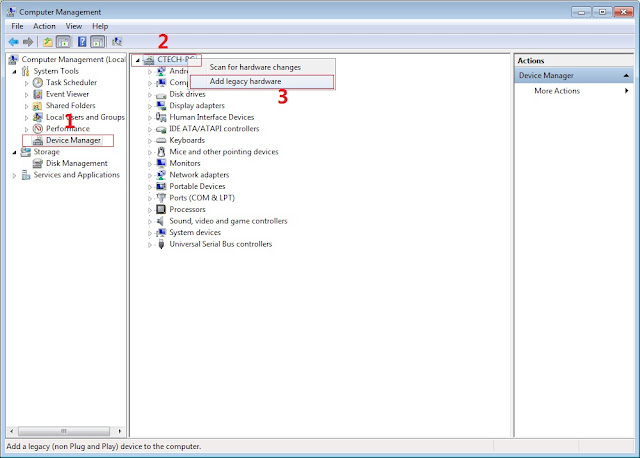
Now in Add Hardware Wizard click on Next » Install the Hardware that i manually select from a list (Advanced) » Show All Devices » Next » Have a Disk, Now select the any inf file from where you extracted the downloaded VCOM driver package.

3. Now Click on Next and select Install this driver software anyway and wait for finishing the process.

4. After installation is finished then Restart your computer, That's it.
5. Open flash_tool.exe, click on the Download Tab
Extract the downloaded Stock rom to desktop of your computer.
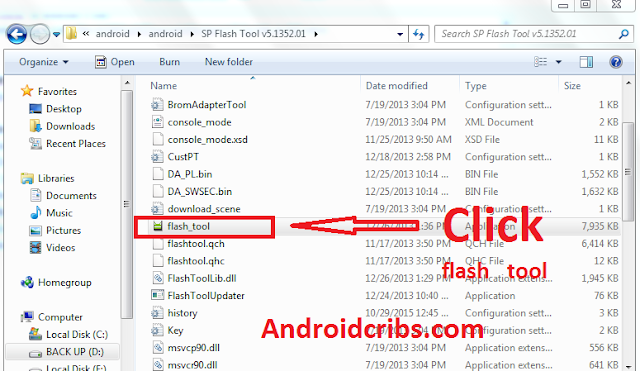
Extract the downloaded Stock rom to desktop of your computer.

6. Click Scatter-loading and browse for the scatter file (MT6582_Android_scatter)
7. For Bootloop only
Make sure flashing mode is set to "Download Only" and check mark all except Preloader.
Note: If deadboot/hardbrick set "Download+Format" and check Preloader.
Make sure flashing mode is set to "Download Only" and check mark all except Preloader.
Note: If deadboot/hardbrick set "Download+Format" and check Preloader.
8. Click Download.


9. Turn off your phone, connect your phone to the PC and wait for the flashing to commence.
10. Green Circle image with check will show once flashing is completed. That's it!


11. Disconnect your phone in USB cord then on your phone! If still bootloop Go to recovery mode
Reboot and press vol up and power On button. Then perform Wipe cache and data or Factory reset!
Note: . After Flashing the ROM, you will be stucked up in MyPhone logo. So follow the steps below.
A. Turn Off the Phone
B. Hold Power + Volume Down
C. Go to Signaling Test, and press Menu button.
D. Wait for a while and you will see selections, choose TEST PASS and REBOOT.
Credits:
Benjie Loria
MyPhone RIO 2 Lite | Micromax Unite 3 | Wiko Bloom 2 UNITED™ Group
http://androidcribs.com
Labels: Bootloop, Deadboot, Myphone, Myphone rio 2 lite
posted by kjnb @ January 24, 2016
0 Comments


