mentech
mentech for all roms games apss and all phone fireaware
Thursday, January 14, 2016
[ROM] Doogee Valencia ROM for CherryMobile Cubix Cube 2
[ROM] Doogee Valencia ROM for CherryMobile Cubix Cube 2
Labels: Cherry Mobile, Cubix Cube 2, custom rom
Tuesday, December 29, 2015
[ROM] Lewa OS 6 for Cherry Mobile Cubix Cube 2
FEATURES:
Real Lewa OS
Deodexed
Not Rooted, (flash superSU)
Real Lewa OS
Deodexed
Not Rooted, (flash superSU)
Bugs, tell me
Instruction:
Download
Put to storage
Reboot to recovery
Wipe
Flash ROM
Reboot
Download
Put to storage
Reboot to recovery
Wipe
Flash ROM
Reboot
ROM Link -> Click Here
Credits:
Gio Olorvida for porting
En.miui.com (for the rom)
Maximum Porting Team
Lynx Porting Team
Unknown Porting Team
Gio Olorvida for porting
En.miui.com (for the rom)
Maximum Porting Team
Lynx Porting Team
Unknown Porting Team
Labels: Cherry Mobile, Cubix Cube 2, custom rom, Lewa ROM
Sunday, December 13, 2015
[ROM] Samsung S6 Dual for CM CUBIX CUBE 2
Labels: Cherry Mobile, Cubix Cube 2, custom rom, Samsung Galaxy S6
[ROM]Pussy Fap v4 - Beast Rom for CM Cubix Cube 2
Labels: Cherry Mobile, Cubix Cube 2, custom rom, Pussy Fap Rom
Tuesday, December 8, 2015
Monday, November 30, 2015
[TUT] how to fix bootloop on Cherry Mobile Cubix Cube 2
Requirements:
PC
USB Cable
Download Links:
Mediatek VCOM Drivers
Cherry Mobile Cubix Cube 2 StockromMediatek VCOM Drivers
Instructions
1. Download all necessary files and Enable USB Debugging mode in your phone..
2. Install Drivers Mediatek VCOM Drivers
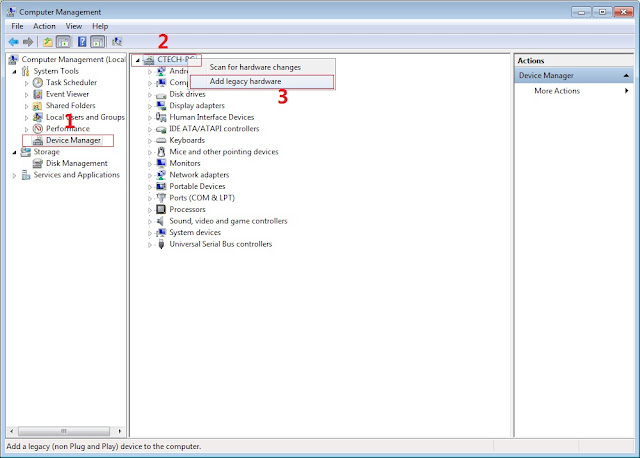
In Device Manager Right click on PC name(Right Side) and then click on Add legacy hardware as shown in image below.

Now in Add Hardware Wizard click on Next » Install the Hardware that i manually select from a list (Advanced) » Show All Devices » Next » Have a Disk, Now select the any inf file from where you extracted the downloaded VCOM driver package.
3. Now Click on Next and select Install this driver software anyway and wait for finishing the process.
4. After installation is finished then Restart your computer, That's it.
5. Open flash_tool.exe, click on the Download Tab
Extract the downloaded Jiayu g6 stock rom to the new folder you created.
6. Click Scatter-loading and browse for the scatter file (MT6592_Android_scatter)
7. For Bootloop only
Make sure flashing mode is set to "Download Only" and check mark all except Preloader.
Note: If deadboot/hardbrick set "Download+Format" and check Preloader.
Make sure flashing mode is set to "Download Only" and check mark all except Preloader.
Note: If deadboot/hardbrick set "Download+Format" and check Preloader.
8. Click Download.
9. Turn off your phone, connect your phone to the PC and wait for the flashing to commence.
10. Green Circle image with check will show once flashing is completed. That's it!
11. Disconnect your phone in USB cord then open if still bootloop then try to factory reset in recovery settings. To go in recovery mode reboot your phone hold and press power on and volume up simultaneously until recovery mode appeared.
Credits:
Gio for rom
Cube Cubix2 group
Credits:
Gio for rom
Cube Cubix2 group
Labels: Bootloop, Cherry Mobile, Cubix Cube 2
Saturday, November 28, 2015
[ROM] [MAXIMUM] CyanogenMod 12.1 Stable version for Cubix Cube II
[ROM] [MAXIMUM] CyanogenMod 12.1 Stable version for Cubix Cube II
- Whats New?
- Real CM12.1 ROM
- Smooth + Beast Mode ROM
- Offline Charging Works
- Hotspot Works
- Video Recording in Stock Camera Working
- FM Radio Working
- Rooted(check USB Debugging)
Features:
- The ability to control every part of the Mod.
- Simplified access for new users/not willing to flash the Mod through the recovery.
- Booster Mode for better performance and battery life.
- Full memory management/Better multitasking.
- Linux kernel tweaks and improvements for better performance and battery life.
- Less lags for gamers.- Entropy generator engine used to reduce lags.
- Zipalign apps in "/system" and apps in "/data" every 24 hours which result in less RAM usage.
- Better thermal management and less overheating.
- Sqlite optimizations and faster database access.
- Increased SD Card read-ahead cache to 2048 KB for faster SD card read and write.
- Build.prop tweaks and improvements.
- Cleans log files and tombstones at every boot.
- Many other tweaks for better performance and battery life!
--------------------------------How to Install? [MUST READ]-----------------------------
--------------------FLASH THIS ROM USING PHILZ RECOVERY--------------------------
Since we have a unit with no external sdcard, the philz recovery only detects the internal storage of our unit /data/media. Read instruction on "HOW TO FLASH THE ROM"to avoid any problems.
- -DOWNLOAD ROM "cm-12.1_Stable_Lynx.zip"
- -DOWNLOAD UPDATE PATCH "cm12.1_stable_v1_Cubix_II_patch.zip"
- -Put the ROM and UPDATE in internal storage
- -Reboot to "PHILZ RECOVERY"
- -go to WIPE
- -Wipe Factory Reset
- -Wipe Dalvik-Cache/ART
- -Install zip /sdcard
- -Install "cm-12.1_Stable_Lynx.zip" ROM First
- -(Disregard the errors when flashing ROM, don't worry ROM still works 100%)
- -After flashing ROM, Go back
- -Install "cm12.1_stable_v1_Cubix_II_patch.zip"
- -Wait untill Success
- -Reboot Phone
- -Wait 2-4 minutes.
- -Done!
POST INSTALLATION INSTRUCTION
1.) Camera
- Go to stock camera app
- Tap Next
- Go to Settings (How? Swipe from Left Edge to Right)
- Go to Resolution & Quality
- Set Back Camera Video to 720p or 480p (note: don't try for 1080p or HD quality in recording, mag la-lag lng pag play mo)
- Done
2.) How to Root
- Go to Settings
- GO to About Phone
- Tap "Build Number" 4-5 times Until Developer Settings is enabled
- Go Back
- Swipe Down Until you see "Root Access" Tap it
- Set it up according to your choice
FAQs
- Sir wla ako makita sa Philz nung nag tap ako "install zip /sdcard"
- - eto gawin mo: follow mo lng:
- -1. tap "install zip"
- -2. tap "Choose zip Using Free Browse Mode"
- -3. tap "Start Folder in /sdcard"
- -4. go to "data/"
- -5. go to "media/"
- -6. (you should now be in the internal storage)
- -7. tap "Set current folder as default"
- -8. tap "Choose zip from /sdcard"
- -9. Locate where you store the ROM and PATCH
- -10. (Di mo parin na kita?)
- -11. tap "0" Folder
- -12. Locate where your ROM, PATCH is"
- -13. Flash ROM, PATCH
- -14. Reboot
- (NOTE: if touch is not working, use VOLUME BUTTONS UP & DOWN to navigate, and POWER BUTTON to select)
- Nag Force Close Minsan ang Music
- -It's Fine. Just re open the app
- Nag s-skip yung kanta/Music
- -Sa umpisa lng yan. after mga ilang kanta okay na yan. or Reboot Phone
- Nag F-Force Close ung Camera pag nag palit ako ng Theme
- - Restart Phone
- Nag F-Force Close ang PlayStore pa minsan minsan
- - Dahan2 lng kasi :D. re-open Play Store App
- Nag break kami ng syota ko :'(
- - Wala ako kasalanan haha
Download Link:
- ROM - Click HERE!
- Update - cm12.1_stable_v1_Cubix_II_patch.zip
- PATCH 2 For Bug Call
Credits: (Important Part)
- Jonacx D Greyt For this Awesome ROM
- Danilo Sarmiento Caballero
- Carl Baluran
- Gio Olorvida
- MAXIMUM PORTING TEAM
- SKK LYNX UNITED ADMIN
- Lynx Porting Team
- CyanogenMod
- Google.com
- Facebok.com
- Source of this ROM
- Tools for Porting This ROM
- Other Developers Who contributed to this ROM
- Sheena Tanael - Tester
Labels: Cherry Mobile, Cubix Cube 2, Cyanogenmod, Maximum Rom