Wednesday, August 15, 2012

How to fix paid apps from Play Store on KitKat and Jelly Bean

KitKat, the latest version of Android, and Jelly Bean, the version before that had implemented a security feature to thwart app piracy. Now, when you download any app from Google Play Store, it integrates a device id in the app before downloading/installing it at /mnt/asec on your device. This location is 'encrypted' and is different than the usual location /data/app. There are a few technical details but long and short of it is that those apps then don't work on Jelly Bean. Most of the users are reporting that this happens only for paid apps. But I saw this happening with my free apps as well. All my apps are getting a bad rep due to this. And I'm fielding a lot of refunds too.

I did a lot of searching and code troubleshooting since morning. Some reports said that Google has turned off this DRM 'feature' for the time being and that this problem is resolved for now. Well, doesn't seem to be true in my case. I found one workaround for this though. How to make paid/free apps, specially theme packs work on Jelly Bean when purchased/installed through Play Store? Read on to find out.


  • You need to have a rooted device with Titanium Backup installed on it.
  • Run Titanium Backup and go to "Backup/Restore" tab.
  • Scroll down the list of apps and tap the app which is not working after installing from Play Store.
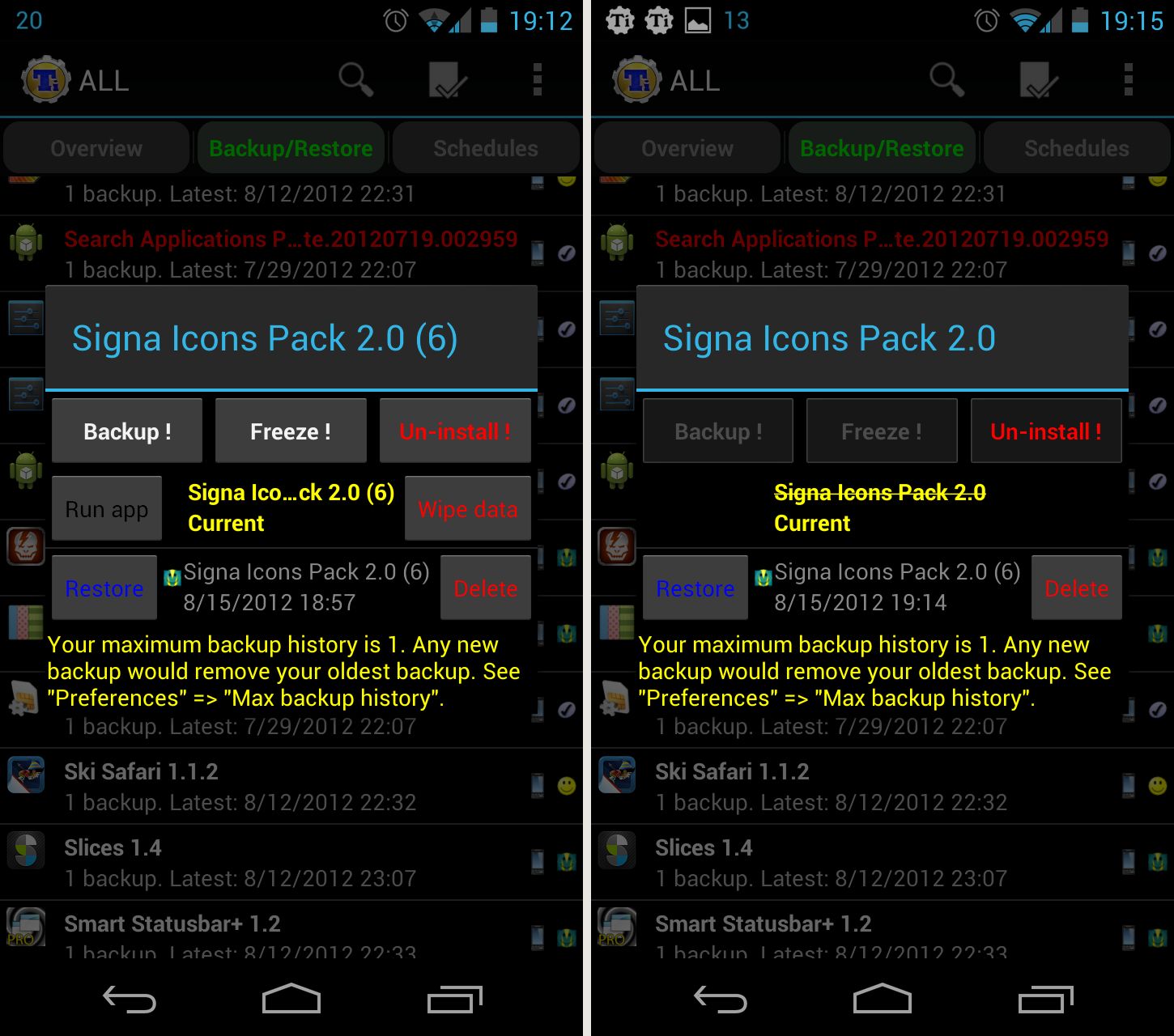
  • Click "Backup". (Left screenshot below)
  • Tap the app again and this time click "Restore". (Right screenshot below)
  • When asked "What would you like to restore ?", press "App + Data".
  • Exit Titanium Backup. Your malfunctioning app will now be working.

==============================================
UPDATE - 4/16/2014
Users don't need to do this anymore for UCCW skins. Even though the issue is still existing in Android devices running Jelly Bean and higher, a workaround solution was provided by the UCCW developer Vin. The UCCW skin apps that you now download from play store come in the form of skin installers. That is, the UCCW skin apps are now wrapped inside another app, which helps to install the skin app. This is how this works -

  1. On your Android device, go to Android settings > Security, and make sure "Unknown sources" is enabled. This is so that the installer app that you download from play store will be able to install the skin app that it is carrying inside itself.
  2. Launch the installer app from app drawer and tap "Install Skin" button in the app.
  3. If your device is running anything below KitiKat, it will ask you whether you want to replace the app. This step is replacing the skin installer with the actual skin. Tap "Ok" here. OR
  4. If you are using a KitKat device, it will ask whether you want to update the existing app.
  5. Tap "Install". When that finishes, tap "Done". The installer app is replaced by the skin app at this point and you're good to go.


Other related articles -
Icon Packs.
Ultimate UCCW skins for Android.

If you appreciate my effort, please buy some of my apps from iWizard Store.

Keywords: JellyBean, PlayStore, Encryption, DRM, Titanium Backup

Labels: , , , ,

Friday, October 17, 2008

Local Face Off : Firefox 3 vs IE 8 vs Chrome

It's been long since I last posted here. It's not that I was not in touch with happenings of tech world. Just that I've been really busy with all my office work and the 'Marriage : Not made in heaven' series. Anyway, came across two things that drew me towards my tech blog to write something. First was the introduction of Threaded scraps in Orkut. But that topic is already covered in Inside Orkut. So, I gave that a skip. But then I came across some issues with Firefox 3 which was affecting my blogs. So, am writing this post now.

Firefox 3 was launched with much fanfare and was instant hit with users worldwide. There are surely some lucrative added features in this new version; such as the smart address bar, easy bookmarking, tags, keywords, save on exit etc. But slowly I'm coming across some deficiencies. All of a sudden, Java and Ajax scripts of my blog are not working properly in this Firefox. For example, take this page for example - http://geniousatplay.blogspot.com/2008/05/marriage-not-made-in-heaven_06.html. The desired effects on this page are -
  • Effect 1 : The top white box which says 'This is part 3 of this series.' should have rounded edges.
  • Effect 2 : When the 'Pull' string is clicked, the hidden top bar [named 'curtain'] should roll out.
  • Effect 3 : Smiley texts should be replaced by their corresponding icons
This list excludes effects that are properly working in all browsers, including Firefox 3.
Now, you can open the above page in the following three browsers for comparison - Firefox 3, IE 8 and Google Chrome. Let's see -


  • Effect 1 :

    Firefox and Chrome are rendering the rounded edges perfectly. But the IE 8 is still not able to work it. It is displayed as a regular rectangular box, which is looking butt-ugly amidst all the other round edged sections. Ahhh, IE always had issues with round edges and PNG image transparency. I had hoped that this will be taken care of in IE 8 but seems IE has a long distance to cover.
  • Effect 2 :

    The pull effect is not working in Firefox. It is working perfectly in other browsers. This is one effect that I really like and is 'uber-kool' factor of my blog. But when it failed in firefox, I tried to debug it. But to no avail, as it wasn't my code's mistake. Firefox blew it.
  • Effect 3 :

    :-) Sweet effect, huh? Firefox doesn't think so. Again, both IE and Chrome are displaying this effect perfectly. But not Firefox. The Smiley texts are displayed as plain text only. My posts look so, ummmmmmm, texty only. :( This made me waste so much of time. I did so many changes in my script and my blog code to see if that makes any change, but everything failed. firefox just won't do it. :@ And, when I saw today that the smiley-s are showing up beautifully on other browsers, I was soooo pissed off on FF.
Amazing and irritating thing is - all these 3 effects are working properly on the home page - http://geniousatplay.blogspot.com . Pull string is working and Smiley icon is also appearing. God knows what's Firefox's fight with the post pages and why the scripts are failing there. Whatever the issue is, I had to abandon recommending Firefox to my visitors. Notice the transparent bar at the bottom of the blog? Where you see the link of 'Google Chrome', that place was adorned by Firefox 1.5+ ever since the blog went online. But today, I changed it to Chrome, as chrome best displays my blog. Time for a change, what say?

I guess I over-reacted w.r.t the Effect 3. It is working fine on this blog [iWizard, the one you are reading right now]. But dunno what's wrong with Genius @ Play. Other browsers are displaying smileys which FF couldn't. Strange.

Labels: , ,

Sunday, September 2, 2007

Blogger Hacked ...?

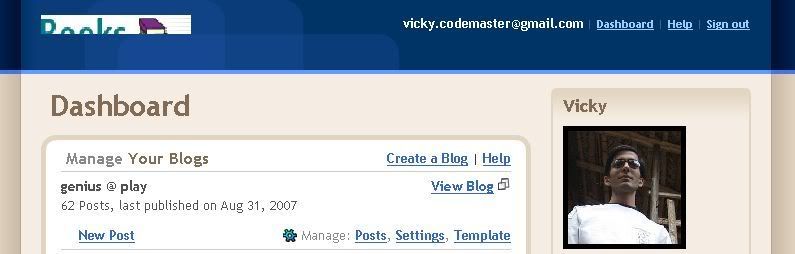
Just as I logged into blogger today, I found the blogger logo missing from the header of the dashboard. Instead of the Blogger logo, there was this half cropped image having 'Books' written on it. Have a look below.

What's this....?? Blogger hacked? I don't think so. Guess the logo has somehow been replaced with this weird image. The logo URL is http://www.blogger.com/img/logo40.gif but this now shows the 'Books' image. Google - look what's wrong.

Labels: , ,