Thursday, August 18, 2016

[ROM][MM] Slim 6 v0.9 AOSP [Flare S3 Power]

[ROM][MM] Slim 6 v0.9 AOSP [Flare S3 Power]
Your warranty is now void.I am not responsible for bricked devices, dead SD cards, thermonuclear war, or you getting fired because the alarm app failed. Please do some research if you have any concerns about features included in this ROM before flashing it! YOU are choosing to make these modifications, and if you point the finger at me for messing up your device, I will laugh at you!!!!

Slim 6 screenshots Slim 6 Screenshots Slim 6 v0.9 Screenshots


WORKING:
Dual SIM
Wifi
Hotspot
Microphone
Bluetooth
Audio
Sensors
Camera (photo and video recording)
GPS
FMRadio (Earphone only)
Offline Charging
Bluetooth audio
SmartCover
OTG
Multi-Window
BUGS: Emulated storage, VPN (works for others), sometimes camera FC’s when taking photos
Workarounds:
Video Recording
Use CAMU app for video recording, download it from Playstore
Multi-Window
1. Go to Settings-About phone tap build number 5 times
2. Go to developer options
3. Find Multi-window mode, activate it
4. Confirmation prompt will pop just tap enable
5. Enjoy!!!
Before Sleep/Phone lags do a reboot else power off if you will not use for long. CM roms in 92 chip has memory leak which causes bootloop.
Friendly Suggestion: much better po na wag na mag install ng fb app, malakas po kasi to sa ram. use fb lite + messenger nlang po. then use ice box from PS po, to freeze 3rd party apps while not in-use. tapos reboot nlang po pag lag
YOU ARE FREE TO PORT THIS ROM, JUST GIVE CREDITS TO ME AND MY SOURCES!!! THANK YOU!!!
Gapps: http://opengapps.org/ (platform: arm, android: 6.0, variant: pico(recommended), do not use greater than micro variant ) (Please grant permissions to Contacts, Location so you can download from PS)
How to flash (TWRP 2.8+)
- Make sure you already got a nandroid backup,
DO ONLY A FACTORY RESET! (Wipe data,dalvik,cache. dont wipe the system)
- Install the ROM
- Flash Gapps directly after flashing the ROM
- Restart after flashing gapps
- Enjoy
Credits:
Slim OS dev/team
Ajit Guraya built for generic mtk
John Reinel Caluag for porting to x300
Cyanogenmod
Rohan Taneja
Ferhung
Fire855
Hyperion70
Himura
Xda-developers
Google drive
God Speed! 
- Admin JRC

Labels: , , ,

Thursday, July 14, 2016

Broken OS 4.7 for Cherry Mobile Flare S3 Power


Broken OS 4.7 for Cherry Mobile Flare S3 Power

Broken OS 4.7 for Cherry Mobile Flare S3 Power Screenshots

WORKING:
Dual SIM
Wifi
Hotspot
Microphone
Bluetooth
Audio
Sensors
Camera (photo and video recording)
GPS
FMRadio (Earphone only)
Offline Charging
Bluetooth audio
SmartCover
OTG
Multi-Window
BUGS: Emulated storage, VPN, Led notif
Workarounds:
Multi-Window
1. Go to Settings-About phone tap build number 5 times
2. Go to developer options
3. Find Multi-window mode, activate it
4. Confirmation prompt will pop just tap enable
5. Enjoy!!!
Before Sleep/Phone lags do a reboot else power off if you will not use for long. CM roms in 92 chip has memory leak which causes bootloop.
Friendly Suggestion: much better po na wag na mag install ng fb app, malakas po kasi to sa ram. use fb lite + messenger nlang po. then use ice box from PS po, to freeze 3rd party apps while not in-use. tapos reboot nlang po pag lag

Download Link;
ROM: Google Drive
Gapps: Download Link (platform: arm, android: 6.0, variant: pico(recommended), do not use greater than micro variant ) (Please grant permissions to Contacts, Location so you can download from PS)

How to flash (TWRP 2.8+)
- Make sure you already got a nandroid backup,
DO ONLY A FACTORY RESET! (Wipe data,dalvik,cache. dont wipe the system)
- Install the ROM
- Flash Gapps directly after flashing the ROM
- Restart after flashing gapps
- Enjoy

Credits:
Knight Owls Porting Assasin
Dysfunctional devs for a great rom
Cyanogenmod
Fire855
Ferhung
Hyperion70
Himura
Ajit Guraya
John Reniel Caluag for porting to 92
TRT
Xda-developers

Labels: , , ,

Monday, February 29, 2016

How to Fix bootloop / deadboot for CM Flare S3 power (lollipop)

 How to Fix bootloop / deadboot for CM Flare S3 power (lollipop)


This tutorial on how to fix bootloop or deadboot in Flare S3 Power running in Android 5.1 version via SPFT. This is updated Stockrom  last Nov. 18, 2015. This only work in S3 power Lollipop version I'm not sure if could work to upgrade your Kitkat to Lollipop.
CM FLARE S3 POWER LOLLIPOP


Requirements:
PC/LAPTOP(WINDOWS OS)
USB CABLE
PHONE
FLARE S3 POWER stockrom (needrom)


FOR WINDOWS XP/7 -INSTALLING DRIVERS
1. Download Mediatek Driver and Extract then Install the driver for 32 or 64 bit operating system of windows 7.
Driver Choose 32 or 64 bit
2.  Before you plug your phone in PC, you need to focus in Device Manager, then plug your phone without the battery you only have approximately 5 seconds to appear MT65xx device that shows under Other devices, you need to right click it as soon as you see it.
MTK USB PORT

Then after you rightclick, click to Update driver software

3. Then choose - Browse my computer for driver software
Browse Driver

Browse the Mediatek MT65xx Preloader Driver folder

Make sure you know the version of OS to choose the right driver for your PC.

Choose your OS version, then choose if 32-bit or 64-bit for your PC.

E.G. s Win7  folder:
usb2ser_Win7.inf - if 32-bit
usb2ser_Win764.inf - if 64-bit

4. Another options, to find right driver for your phone is to open your internet while your phone is connected without the battery and automatically searching driver for your phone.

FOR WINDOWS 8/8.1/10 -INSTALLING DRIVERS
1. Download all necessary files and Enable USB Debugging mode in your phone..
2. Install Drivers USB_VCOM_Driver.rar
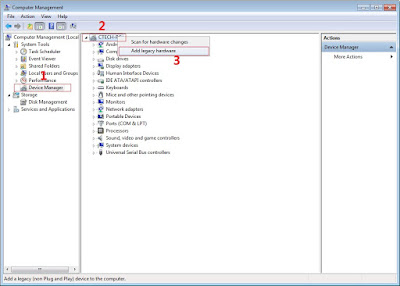
In Device Manager Right click on PC name(Right Side) and then click on Add legacy hardware as shown in image below.

add legacy
Now in Add Hardware Wizard click on Next » Install the Hardware that i manually select from a list (Advanced) » Show All Devices » Next » Have a Disk, Now select the any inf file from where you extracted the downloaded VCOM driver package.

mediatek preloader

3.  Now Click on Next and select Install this driver software anyway and wait for finishing the process.

Install driver anyway

4.  After installation is finished then Restart your computer, That's it.
If still not success in installing driver just Disabled Driver Signature Verification
1. Go to PC Settings>General>Troubleshoot>Advanced Options>Startup Settings>Disabled Driver Signature Enforcement>Then Restart
disabled driver signature verification
Once you disabled. Then follow the procedure above to install the driver. Once success proceed to next step.

II-FLASHING VIA SPFT
1. Open flash_tool.exe, click on the Download Tab
 Extract the downloaded AFP2 stock rom to the new folder you created.
Click flash tool

2. Click Scatter-loading and browse for the scatter file (MT6592_Android_scatter)
3. For Bootloop only
 Make sure flashing mode is set to "Download Only" and check mark all except Preloader.
Note: If deadboot/hardbrick set "Download+Format" and check Preloader.
4. Click Download.
mt6592-scatter-file-spft

5. Turn off your phone, connect your phone to the PC and wait for the flashing to commence.
6. Green Circle image with check will show once flashing is completed. That's it!

SPFT SUCCESS

7. Disconnect your phone in USB cord then open if still bootloop then try to factory reset in recovery settings. To go in recovery mode reboot your phone hold and press power on and volume up simultaneously until recovery mode appeared.


Credits:
Needrom
Dess Lagnirac

Labels: , , , ,

Sunday, December 13, 2015

How to root CM Flare S3 Power Lollipop and Install Custom Recovery

How to root CM Flare S3 Power Lollipop and Install Custom Recovery

CM Flare S3 Power Lollipop Root and CTR


Preparations:
============================

Download all:
USB driver Driver_Auto_Installer or
PdaNet+ v4.18 
SP_Flash_Tool_v5.1516.00
Carliv_Root 
Stock Recovery 
BETA-SuperSU-v2.52.zip
UPDATE:
TWRP (rename into recovery.img)


WARNING: Do NOT Connect Phone to PC
   Turn Off Antivirus Protection Temporarily


=================================
Installation Instructions:
=================================

A. Driver_Auto_Installer

1. Extract Driver_Auto_Installer
2. Right Click Install.bat and Run as Administrator
3. upon installation,there will be a prompt. click Install right away
DONE!!!


B. PdaNet+

1. Right Click PdaNetA4180.zip and Click Extract All.... then Click Extract button
    -Now you have PdaNetA4180 Folder
2. Open PdaNetA4180 Folder
3. Right Click PdaNetA4180.exe and Run as Administrator
4. Click Next button and Accept License Agreement
5. USB driver found will pop-up Click Yes
6. Phone Selecton will pop-up Click Others(or if you are not sure) then Click OK
7. USB Driver Installation will pop-up Click Skip USB
8. There will be 2 Pop-ups Click X Mark for each Pop-up
9. From the Botom Right Corner you will See an Icon of PdaNet+ saying Not Connected with Red X Mark
DONE!!!


C. SP Flash Tools

1. Transfer SP_Flash_Tool_v5.1516.00.rar to C: Drive
2. Right Click SP_Flash_Tool_v5.1516.00.rar and Click Extract All.... then Click Extract button
Now you have SP_Flash_Tool_v5.1516.00.rar Folder inside C: Drive


INSTALLING MTK DRIVERS FOR WINDOWS 8/8.1/10/ 32bit/64bit

1.  Firstly Download MTK USB VCOM Drivers for you device model from the below link.
2. Now open Device Manager in your PC by right clicking on My Computer and then click on Manage.
3. Next go to Device Manager in that and click on your PC name and then click on Add legacy hardware
4. Now in Add Hardware Wizard click on Next >> Install the Hardware that i manually select from a list (Advanced) >> Show All Devices >> Next >>Have a Disk >> Browse, Now select the any inf file from where you extracted the downloaded drivers.
5. Now click on Next on the wizard to install the drivers and when promoted for security issue just click on install any anyway to finish the driver installation.
6. That’s it after clicking on Finish Restart your PC and use your tool with VCOM Drivers.
DONE!!!


FLASHING THE RECOVERY1. Click Scatter Loading
2. Gamitin lang ang "MT6592_Android_scatter.txt" kasama sa rar
3. Siguraduhin na walang check lahat maliban sa recovery
    Follow this like in image below...
SPFT RECOVERY FLASH

4. Double Click nyo yung recovery ibrowse yung recovery.img na galing sa rar
5. Press Download button (wag muna isasaksak sa PC)
6. Plug nyo na sa PC ang Phone

Note:*press and hold power button, after 3 secs press naman volume down(basta lumabas na yung logo press agad volume down) para makapunta sa ctrecovery at dun iflash ang BETA-SuperSU-v2.52.zip
ulitin ang pagflash sa recovery pag sa 1st boot di nakapunta sa ctrecovery

kung magfactory reset kau, flash nyo muna stock recovery(mawawala kasi imei nyo pag nagfactory reset sa ctr)

7. Important: Disconnect your phone from the computer, press and hold Vol Up + Power.
8. Boot menu will show, select Recovery.


From the custom recovery (CWM), it is recommended to backup your phone first, before rooting.


To root:
1. Reboot your  phone then press and hold Vol Up + Power On
 the CWM Recovery , click Install zip.
Screenshot
2. Choose zip from storage/sdcard1
Screenshot 1


3. Select BETA-SuperSU-v2.52.zip.
Screenshot 3
 4. Tap Yes Install BETA-SuperSU-v2.52.zip.
Screenshot 4

5. Flash it, no need to wipe cache. Wait to finish. Once completed then reboot!
Screenshot 5

4. Enjoy your rooted  CM FLARE S3 Power

Then download Root checker in Playstore to verified.

Credits to
@Nick Fury
@June Jimenia

@Rafael Santiago
CM Flare S3 Power Community

Labels: , ,

Saturday, October 3, 2015

[ROM] CleanKat v4.1 for CM FLARE S3 POWER

[ROM] CleanKat v4.1 for CM FLARE S3 POWER

[ROM] CleanKat v4.1 for CM FLARE S3 POWER Preview 1

[ROM] CleanKat v4.1 for CM FLARE S3 POWER Preview 2


ROM FEATURES
1.Based on latest mmx KK, so it's totally bugfree
2.Better battery life than other KK ROMs, stock kernel
3.Themed to real white complete kitkat, see screenshots
4.Added data traffic monitor in settings, you can toggle it
5.Added 13 new battery icon styles in settings, ported from carbon rom
6.Added battery icon and percentage in notification header, it's useful
7.Themed all icons to beautiful AOSP/NEXUS also removed 3G icon
8.ROM is not rooted, need to flash root zip, see attachments
9.Deodexed /app, /priv-app, /framework for faster app opening speed
10.Wonderful dolby digital sound with equalizer, see download section
11.Build.prop tweaks and init.d tweaks, working ones only
12.Android 4.4.4 easter egg and build prop, fake (4.4.2)
13.Beautiful Cleankat lockscreen, screenshot attached
14.Beautiful Cleankat bootanimation and bootlogo
15.Cleankat music player, advanced calculator and browser
16.Added notes widget for homescreen, useful for many users
17.Cyanogenmod clock widget with working weather
18.Init.d tweaks, vaccuming, loopy smoothness, zipaligned on boot
19.Launcher plus kk as default launcher app, you can install any launcher
20.Added Cleankat white themed file manager based on FO manager
21.Lightest and cleanest rom ever with added all these features, 190mb only


BUGS

- None so far... 
- Please update google services (42mb), search it on play store.

PS: IF MINOR BUGS LANG NMAN EH, OKRAYIN NIYO NLANG! :)

REMINDER! Please make sure to back your NVRAM folder or IMEI before Flashing this one!
How to backup your imei [CLICK HERE]

Flash it with your own RISK!!!

I am not responsible for any damage or soft/hard brick will happened to your device!

DOWNLOAD LINK 


ROM Link:  Click Here

SUPERSU: Click Here


HOW TO FLASH

- Make sure you already got a nandroid backup
- Factory reset
- Wipe cache and dalvik cache
- Install the ROM
- Restart after flashing.


CREDITS
KATH XD
xda-developers
Google
Cherry mobile
Mega
Lynx Porters :)
Skk lynx
etc...


Labels: , ,

[ROM] HydrogenOS for CM FLARE S3 POWER

[ROM] HydrogenOS for CM FLARE S3 POWER

[ROM] HydrogenOS for CM FLARE S3 POWER Preview 1

[ROM] HydrogenOS for CM FLARE S3 POWER Preview 2

[ROM] HydrogenOS for CM FLARE S3 POWER Preview 3

[ROM] HydrogenOS for CM FLARE S3 POWER Preview 4

HydrogenOS MTK Mod
Cyanogenmod 12.1 R16 based
Gapps included


* Goto custom recovery, Philztouch is prefered
* Wipe Factory reset/default
* Wipe cache/dalvik cache
* Flash FS3POWER_HydrogenOS_Part1.zip
* Reboot device
* Wait device until finish booting and run as standard rom
* Reboot to recovery
* Flash FS3POWER_HydrogenOS_Part2.zip
* Reboot and enjoy


Bugs? pls report... this is Beta.

REMINDER! Please make sure to back your NVRAM folder or IMEI before Flashing this one!
How to backup your imei [CLICK HERE]

Flash it with your own RISK!!!

I am not responsible for any damage or soft/hard brick will happened to your device!

Download Rom1 and Rom 2 then extract
ROM 1: Click Here

ROM 2: Click Here

Para sa Quick Setting

Ganito, punta k s settings tapos about phone, enable advance mode, then makita u ung notification drawer


CREDITS:
Allen Alfonso
JONACX D GREAT
Cyanogenmod Team
Maximum Team

Labels: , ,

Friday, October 2, 2015

[ROM] WINDOWS 8 For CM Flare S3 Power

[ROM] WINDOWS 8 For CM Flare S3 Power

Windows 8 Rom for Flare S3 Power Preview 1

Windows 8 Rom for Flare S3 Power Preview 2

Windows 8 Rom for Flare S3 Power Preview 3

Windows 8 Rom for Flare S3 Power Preview 4

Windows 8 Rom for Flare S3 Power Preview 5

Windows 8 Rom for Flare S3 Power Preview 6

Windows 8 Rom for Flare S3 Power Preview 7


***FLASH AT UR OWN RISK***

I am not responsible for bricked devices, dead SD cards, thermonuclear war, or you getting fired because the alarm app failed. Please do some research if you have any concerns about features included in this Patch before flashing it! YOU are choosing to make these modifications, and if you point the finger at me for messing up your device, I will laugh at you. ALWAYS DO A BACKUP, BACKUP and LASTLY BACKUPS!


Disclaimer: Im not held responsible if you brick your phone, Read doc, Follow simple instructions


Features:
  • Android 4.4.4
  • Windows 8.1 UI
  • App Traffic Control
  • SafeBox (vault for hiding confidential files)
  • Pre-rooted (Kinguser)
  • ClearMotion ™ Video Enhancer
  • Built-in Power Saver
  • Motion Gestures
  • Xperia Keyboard
  • InFocus Support
  • Builtin apps like Lucky Patcher, Root Explorer


How to Flash ROM:
  • Place zip file of Windows 8.1 ROM in SD Card.
  • Reboot into recovery 
  • Select Wipe on Main Menu, then Swipe to Wipe User Data/Cache/Dalvik Cache
  • Wipe /System
  • Go back to Menu, then select Install
  • Locate the ROM file (zip), then Swipe to Install. Wait for a few minutes as the ROM is being flashed.
  • Once the flashing is done, reboot the phone. Initial startup of the phone will take about 5-8 minutes as the ROM is being initialized for first use.


NOTE : WALANG PILITAN SA MAY GUSTO LNG HA KUNG AYAW MO NETO MAG COC K NA LNG


***X P L O R E   T H E   R O M***


HOW TO GET STATUBAR:


1. Download and Install Xposed Installer 
2. Open Xposed Installer
3. Click Module
4. Check the box of Lucky Patcher and click back
5. Click Framework
6. Click Install Update and Click OK
7. Mag Reboot yan
8. DONE 

REMINDER! Please make sure to back your NVRAM folder or IMEI before Flashing this one!
How to backup your imei [CLICK HERE]

Flash it with your own RISK!!!

I am not responsible for any damage or soft/hard brick will happened to your device!

ROM LINK:


XPOSED INSTALLER LINK:


SPECIAL THANKS:
ALLEN ALFONSO
CREDITS:
GLENN CANETE SANDIG 

Labels: , ,