Monday, October 24, 2016

[ROM] VIBEUI_3.5 Firefly Mobile Aurii Envy [MT6753]

[ROM] VIBEUI_3.5 Firefly Mobile Aurii Envy [MT6753]
[ROM] VIBEUI_3.5 Firefly Mobile Aurii Envy [MT6753] Screenshot

[ROM] VIBEUI_3.5 Firefly Mobile Aurii Envy [MT6753] Screenshoot


Disclaimer:
I am not Responsible to any or what may happen to your device.
Make Sure you have a full back up of you stock rom (Current rom)
The ROM is fully tested and Currently on running on my device.

Rom Features:
Smooth UI
Rooted
Multilanguage
Gapps include 
Better battery 

BUG:
Fingerprint Scanner

INSTALLATIONS:
Download the ROM from the link above
Put the zip files on your SDCard
Reboot in Recovery
Perform Wipe All Preflash (system, cache, data, dalvik)
Select "Install zip from SDCard"
Choose ROM zip file
Flash
Wipe Cache & Dalvik Cache
Reboot system

DOWNLOAD LINK
[VIBEUI_3.5_Envy ##download##]


CREDITS:
HADES HADES(Mad Skill Skill)
KOPA (Knight Owls Porting Assassins)
PORTED BY: MADEFU BLUE (it's me)

Labels: , , , , , , ,

Friday, October 14, 2016

New Firefly Mobile G50 for only P2,699


Firefly Mobile G50 specs

Firefly Mobile  announced their newest cheapest smartphone as of this year, the Firefly Mobile G50. According to the news, this specs has built with Android 6.0 Marshmallow, 1.3 Ghz quadcore processor and  5.0-megapixel primary camera that suits for only Php2,699. You can also get freebies like a oleophobic tempered glass screen protector and a clear soft case.This is one affordable backup phone that are really "bang for the buck".


Firefly Mobile G50 Specs:
  • 1.3GHz quad-core processor
  • 1GB DDR3 RAM
  • 8GB internal storage, Expandable up to 128GB via MicroSD Card
  • 5.0-inch Super IPS LCD display
  • 5.0-megapixel primary camera
  • 2.0-megapixel secondary camera
  • 3G, Dual-SIM, WiFi, WiFi Hotspot
  • 2300mAh battery
  • Android 6.0 Marshmallow
  • SRP: Php2,699
Watch Youtube for more specs:
\

Labels: , ,

Wednesday, June 15, 2016

[ROM] X-Ui Rom For Firefly Mobile Intense Desire [MT6753]

[ROM] X-Ui Rom For Firefly Mobile Intense Desire [MT6753]

[ROM] X-Ui Rom For Firefly Mobile Intense Desire [MT6s753] Screenshots [ROM] X-Ui Rom For Firefly Mobile Intense Desire [MT6s753] Screenshots [ROM] X-Ui Rom For Firefly Mobile Intense Desire [MT6s753] Screenshots


X-ui Rom Features:
-No Delay Fast And Beautiful
-Fast Charger
-Smooth
-Font manager
-Theme Xui Support
-Super User
-Rooted
-BusyBox
-Optimized System Performance
-Fix Bug Issue
-Add Multiuser Support
-Many More Just Explore The Rom
BUGS:

Video Player


X-Ui Rom:

Download LInk

HOW TO INSTALL:

Philz Recovery
Clear Wipe Dalvik Art Cache
Clean to Install new Rom
Flash the Rom
Cmw Recovery
Clear wipe
Data
Cache
Dalvik
Flash the Rom

For more speed:

Go to Settings> Developer Options and set
Window Animation Scale
Transition Animation Scale
Animator Duration Scale
Either Off or 0.5x; I used 0.5x.

CREDITS:

Knight Owls Porting Assassins
Mad Skill
Yow Bushkie

Labels: , ,

Tuesday, June 14, 2016

[ROM] HyDroFap v2.0 Rom For Firefly Intense Metal v16 [MT6582]

[ROM] HyDroFap v2.0 Rom For Firefly Intense Metal v16 [MT6582]

[ROM] HyDroFap v2.0 Rom For Firefly Intense Metal v16 [MT6582] Screenshots [ROM] HyDroFap v2.0 Rom For Firefly Intense Metal v16 [MT6582] Screenshots [ROM] HyDroFap v2.0 Rom For Firefly Intense Metal v16 [MT6582] Screenshots

Change Logs:
New UI Theme
Fixed Camera force close in Notif Toggle
Fixed Recents Landscape Mode
Fixed Dialer App
Fixed SystemUI force close in Mms button
Added Ram Meter and Info Toggle
Added Audio Wizard Toggle
Added Battery Info Toggle
Added Statusbar Carrier Label and Logo
Added HeadsUp Notification
Added System, ListView, Scrolling and Toast Animations
Added New Mms App
Added M Platlogo
Bugs:
Equalizer force close not a big deal coz i added flashable dolby atmos for alternative.

ROM LINK:
Download Link

INSTALLATION:
-Boot to Recovery
-Clean to Install New Rom
-Flash the ROm
-Flash the LG keyboard (Set this Keyboard As default in ur Setting)
-Flash the all the other .zip files
-Reboot

Credits:
Team Pussy
ASUS 
Jay Al-Bc 
Maximum Dev/Port Team 
Knight Owls Porting Assassins 
KOPA - Renchie Aycardo
KOPA - Arron Arcilla For Porting

Labels: , ,

Friday, May 27, 2016

How to root, install xposed installer, and flash twrp to Firefly Mobile S90q Metal

 How to root, install xposed installer, and flash twrp to Firefly Mobile S90q Metal
Root, Xposed Installer, TWRP for Firefly Mobile S90q Metal

HOW TO ROOT:
  • Download and install the Kingroot app as you would do with any normal app.
  • Launch the KingRoot app from the app drawer.
  • If your device is supported, then a 'Try to Root' button will appear at the bottom of the screen. Just tap this button and let the rooting process complete.
  • After the device is rooted, a success message will appear on the screen.
  • Due Kingroot is laggy, We need to change to SuperSU...
  • Open the SuperSU installer, allowed only and click the big Blue Circle, wait until reboot!
How to install Xposed Installer:
  • Install Xposed Installer
  • Install Flashfire
  • Xposed SDK put in SDcard to find it easily.
  • Launch the Flashfire App
  • Click the Circle (+) button
  • Choose Flash ZIP or OTA
  • Find Xposed SDK zip in your sdcard
  • Click check in the top
  • Scroll down Then tap FLASH
  • Then wait to reboot Recovery of Flashfire.
  • Boom! you have working Xposed!
  • Enjoy to download any Modules

  • How to flash TWRP Recovery
Requirements:
Rashr tools (download in Playstore)


1. Download twrp and rename to recovery.img
2. Install Rashr tools or Flashify
3. Flash via recovery
4. Reboot.


Credits:
Star Shin Gacuma
Firefly Mobile S90 q metal group

Labels: , , , ,

Saturday, May 21, 2016

ADPT OS V2 FOR FIREFLY INTENSE METAL V16

ADPT OS V2 FOR FIREFLY INTENSE METAL V16
DISCLAIMER: I DO NOT OWN THIS ROM. I ONLY PORTED IT IN OUR DEVICE. I am NOT Responsible to any damage that might happen to your device after flashing this . Make sure to have a Nandroid Backup of your Stock ROM before flashing. Flash this on your own risks.

ADPT OS V2 Screenshots ADPT OS V2 Screenshots ADPT OS V2 Screenshots
×Changelog×
-Added Pie Control (Non-apk)
-Added Font Chooser (Non-apk)
-Added Battery bar
-Added Navbar Enabler (with Height)
-Added Spilit Clock Style Chooser
-Added Weather text along icon on statusbar
-Added Notification Drawer & Lockscreen background chooser option along with transparency seek bar
-Added Screen Recorder (Non-apk)
-Added All CM12.1 Apps
-Back to LP Easter Egg
-Carrier Label (NON-ApK)
-Contextual Statusbar Header Background
-Keyboard Updated
-Added HeadsUP settings
-Added AOKP System Anim
-Added Power Animations
-Fixed Toast Anim FC along with toast anim tester
-Added scrolling cache and list view tester
-ADPT Logo at starting apps dialog box
-Added OTA Updater (Get weekly small bug fixes)
-New awesome boot animation
-Added changelogs on about phone
-Added features list on about phone
-Porter name via build.prop on about phone
-ADPT wallpapers
-And many more
*Whats working*?
Updated to android-5.1.1_r33
Fixed FMRadio volume control
Fixed game crashes
Fixed usb connection problems
Added headset icon in statusbar
Pre-Installed Apps
xposed/xposed framework
gapps
Build.prop tweaks
Sound tweaks
RAM swap enabled
Almost Lag free
No lag on Video Recording "1080p" (tested)
Silent mode call bug fixed (tested)
Clear sounds
Better Battery backup (tested)
Off charging
Network drop (fixed)
Hotspot
FM radio
Bluetooth
Headphone
Headphone (Bluetooth)
USSD (all networks)
Compass (magnetic sensors)
Video recording (stock/any camera app)
LED lights
Sensors
GPS
Smart Cover
Weather Detection
Microphone
Messenger video/voice call
Mobile Data
3g
Dual Sim
WiFi
Init.d enabled
Serial number unknown (fixed)
Better Ram management
Move app to SD (without corrupting the app)
Both storage mountable on PC ,etc
Call bug on silent mode (Fixed)
Loud husky sound (Fixed)
Additional apps hidden on app drawer
Additional options on settings
New modified system apps
Built in gapps
Installed app bug (fixed) (no need to reset trebuchet)
Bugs:
WHEN U PRESS FRONT CAMCORDING YOU WILL GET AN ERROR IF THIS HAPPEN U NEED TO FACTORY RESET UR PHONE
JUST DONT CLICK FRONT CAMCORDING.
OTHER THAN THAT NONE.
=INSTALLATION=
Reboot Recovery
Wipe dalvik & cache
Wipe cache
Flash the Rom
Flash the Gapps
Done
Reboot
×Note×
°Enable module on xposed installer
settings/interface/control center/xposed installer
=If you can use sd as default Go to Settings > Interface > Control Center > Xposed installer > modules long tap app/sdcard enabler. Tap download/updates > versions download 4.0 and install. Launch and check all boxes. Reboot
=If google play services has stopped its fine, update it 
°Default rom is emulated its mean all data files and etc. will be saved in internal
i you want to default sdcard just flash non-emulated patch.
in non-emulated patch u can't see internal try to use Es file explore then find your internal.
Shared folder LINK :


Credits 
@ADPT
@XDA
@imalif
@mickeycute
@kenzukie
@itsraj011
@Darkstar085
@Pac man ROM
@Team Bliss
@Rahul Sehgal
@Team CyanogenMod
@westcrip
@Omni ROM
@Fire855
@Anirudnha
@Al3XKOoL
@tuxboy
@AOKP Rom
@MOKKE ROM
@ANSP ROM
@Esa Yayan
@Maadr
@restu52
@Venkat Kamesh
@Apktool
@gurpreet singh
@ticklefish
*KNIGHTS OWL PORTING ASSASSINS*

Labels: , ,

Monday, May 16, 2016

[ROM][KOPA]Decepticon OS v2 Base on cm12.1 final V3 for Firefly Intense Metal v16 [MT6582]

[ROM][KOPA]Decepticon OS v2 Base on cm12.1 final V3 for Firefly Intense Metal v16 [MT6582]
Disclaimer: I am not Responsible to any or what may happen to your device.
Make Sure you have a full back up of you stock rom (Current rom)
The ROM is fully tested and Currently running on my device.

Decepticon OS v2  Descepticon OS v2  Descepticon OS v2 Screenshots
Changelog:
Updated to android-5.1.1_r33
Fixed FMRadio volume control
Fixed game crashes
Fixed usb connection problems
Added headset icon in statusbar
Built in xposed/xposed framework
Built in gapps
Built in abs tweaks
Build.prop tweaks
Adrenaline tweaks
Sound tweaks
RAM swap enabled
Additional 300 RAM
Lag free
Dynamic status bar
Network traffic meter
Slim pie
Custom carrier label
Color correction
Font chooser
Adblocker
CPU stats
Many more....p
=================================
Features and Bug Fix.
No lag on Video Recording "1080p" (tested)
Silent mode call bug fixed (tested)
Clear sounds
Better Battery backup (tested)
Off charging
Network drop (fixed)
Hotspot
FM radio
Bluetooth
Headphone
Headphone (Bluetooth)
USSD (all networks)
Compass (magnetic sensors)
Video recording (stock/any camera app)
LED lights
Sensors
GPS
Smart Cover
Weather Detection
Microphone
Messenger video/voice call
Mobile Data
3g
Dual Sim
WiFi
Init.d
Serial number unknown (fixed)
Better Ram management
Move app to SD (without corrupting the app)
Both storage mountable on PC ,etc
Call bug on silent mode (Fixed)
Loud husky sound (Fixed)
Additional apps hidden on app drawer
Additional options on settings
New modified system apps
Built in gapps
Installed app bug (fixed) (no need to reset trebuchet)
720p YouTube playback
Built in SuperSU
Bugs:
VPN but you can try the workaround VPN test it
Non-Emulated Patch:
https://mega.nz/…
INSTALLATION:
-Boot to Recovery
-Factory Reset
-Wipe Cache
-Wipe dalvik and Cache
-Clean to Install New Rom
-Flash the Rom
-Reboot
Note:
*Don't update YouTube app
*Enable module on xposed
*Non-emulated patch if you only want your sdcard to become your default saving of your data apps and etc.
Workaround for VPN follow these steps:
(Not tested, you're free to try)
1. go to psiphon and choose browser-only mode don't tunnel whole device
2. go to its logs tab and check the port of http proxy.
3. now open wifi setting and long press to your wifi network(from which u are connected)
4. chosen manual proxy option and put host name as 127.0.0.1 and port as the no. which you noted in step2(eg. 8080) and click save.
you can open your browser and check your ip
note: you have to undo this after you don't need VPN by changing manual proxy to none.
Credits:
Al3XKOoL
CyanogenMod Team
OMNI Team (specially XpLoDWilD and Dr-Shadow)
chrmhoffmann
fire855
ariafan
axet
batsilos
ferhung
Anirudha
Vipul Jha @Optimistic Inc.
Andeveloper @xda
Hazy lp ROM
Exodus lp ROM
Fmd team
MysticOS
Michael Jay
Afzal Alif
Raj Shekhar
Kenzukie
Dane Cruz
Suraj Rawat
Adpt members
[KOPA] Arron Arcilla(for porting it to our device)
[KOPA] Victor Concepcion III(for helping me fixing some bugs)
Knight Owls Porting Assassins

Labels: , ,

Wednesday, February 10, 2016

How to root Firefly Intense Desire and install TWRP Recovery

How to root Firefly Intense Desire and install TWRP Recovery

Firefly Intense Desire Root and TWRP


Requirements:


Firefly Intense Desire


This tutorial teach you on how to root Firefly Intense Desire using updated Kingroot which can root even Android 5.1 or Lollipop version.

1. Download and Install KINGROOT4.8.0.APK
2. Open Kingroot and click Optimize Now
kingroot

3. Wait to finish and click continue.
4. You can uninstall now other apps like Purify.
5. Download Rootchecker in Playstore to verify.


Installing Custom Recovery
Requirements:
Rashr tools
TWRP (rename to recovery.img)(fixing)
PHILZ (rename to recovery.img)1. Download Rashr Tool
2. Boot into Recovery
3. Locate recovery.img the flash!
Enjoy!


Credits:
http://androidcribs.com
Kingroot
Yuweng for TWRP


Labels: , , ,

Friday, November 20, 2015

[ROM] Cleankat v4.1 Firefly mobile Intense Metal (v05 based)

[ROM] Cleankat v4.1 Firefly mobile Intense Metal (v05 based)

CleanKat Screenshot

CleanKat Screenshot 2

CleanKat Screenshot 3


FLASH AT YOUR OWN RISK!

Your warranty is now void. I am not responsible for bricked devices,your girlfriend or wife got mad at you for using this rom, dead SD cards, thermonuclear war, or you getting fired because the alarm app failed.Please do some research if you have any concerns about features included in this Patch before flashing it! YOU are choosing to make these modifications, and if you point the finger at me for messing up your device, I will laugh at you. ALWAYS DO A BACKUP, BACKUP and LASTLY BACKUPS!

REMINDER! Please make sure to back your NVRAM folder or IMEI before Flashing this one!
How to backup your imei [CLICKHERE]

Flash it with your own RISK!!!

I am not responsible for any damage or soft/hard brick will happened to your device!
Rom Link:
Cleankat v4.1 (v05 based) by ryeduran 

Instruction:
download ROM
place it to ur sd card (root)
wipe data/cache
wipe cache
wipe dalvik cache
format system
install zip
reboot...

TO ROOT:
-download superSU
-go to CWM recovery
-install superSU.zip
-reboot

Credits to:
Cleankat Rom
Rye Duran
Sir Umang Leekha
 FF IM Admins
idol narwi3x

Labels: , ,

[ROM] PussyFap ROM Firefly Mobile Intense Metal(based onv14)

[ROM] PussyFap ROM Firefly mobile Intense Metal(based onv14)


PussyFap Rom Screenshot


REMINDER! Please make sure to back your NVRAM folder or IMEI before Flashing this one!
How to backup your imei [CLICKHERE]

Flash it with your own RISK!!!

I am not responsible for any damage or soft/hard brick will happened to your device!
Rom Link:


Instruction:
Downlaod PussyFAP ROM
Boot to recovery(cwm,philz)
wipe data, cache,dalvik cache,system
install zip from sdcard
locate PussyFap ROM
wait for completion
Reboot


Credits to:
-Lindjie Cabatuan
-Pussyfap Group
-to the owner

Labels: , , ,

Thursday, November 19, 2015

How to root and Install Custom Recovery for Firefly Mobile Intense Metal

How to root and Install Custom Recovery for Firefly Mobile Intense Metal
Root and Install Custom Recovery for Firefly Mobile Intense Metal


Rooting:

1. Download KINGROOT apk

2. Install KINGROOT

3. Open and tap "ROOT" (yung bilog na green po)

4. Wait for the process to finish, may lalabas na ROOT at CHECK dun sa green na bilog. It means, rooted na...

You can use Root Checker app sa PS after nio magroot...


Install Custom Recovery

Requirements:
Rooted
Download:


Procedure:
Step 1:Install rashr_tool.apk

Step 2: Move the recovery.img in your SDCARD outside the folder which you can see easily.

Step 3: Open Rashr Tools Grant SuperSu
Click Recovery from Storage
Then choose Recovery.img Click OK

To boot into recovery mode manually, press volume up + volume down + power button

That's it! You can backup and install your desired custom rom now! ..


Labels: , ,

How to fix bootloop in Firefly Mobile Intense Metal via SPFT

How to fix bootloop in Firefly Mobile Intense Metal  via SPFT
fix bootloop in Firefly Mobile Intense Metal  via SPFT


This tutorial is able to help you oh how to fix bootloop and hardbrick in Firefly Mobile Intense Metal.
In case you don't have backup and installed custom recovery you can proceed in this procedure.

Requirements:
PC
USB Cable

Download Links:
Mediatek VCOM Drivers
FIREFLY INTENSE METAL Stock rom


 Instructions
1. Download all necessary files and Enable USB Debugging mode in your phone..
2. Install Drivers Mediatek VCOM Drivers
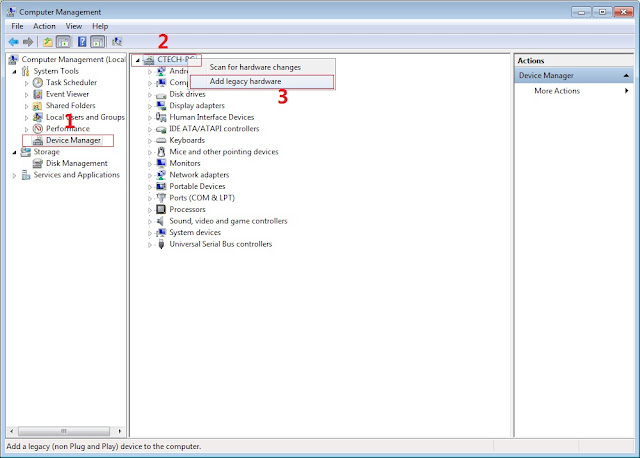
In Device Manager Right click on PC name(Right Side) and then click on Add legacy hardware as shown in image below.

SPFT Screenshot 1
Now in Add Hardware Wizard click on Next » Install the Hardware that i manually select from a list (Advanced) » Show All Devices » Next » Have a Disk, Now select the any inf file from where you extracted the downloaded VCOM driver package.

bootloop in firefly

3.  Now Click on Next and select Install this driver software anyway and wait for finishing the process.

SPFT Screenshot 3

4.  After installation is finished then Restart your computer, That's it.
5. Open flash_tool.exe, click on the Download Tab
 Extract the downloaded Firefly Intense Metal stock rom to the new folder you created.
SPFT Success Screenshot 4

6. Click Scatter-loading and browse for the scatter file (MT6582_Android_scatter)
7. For Bootloop only
 Make sure flashing mode is set to "Download Only" and check mark all except Preloader.
Note: If deadboot/hardbrick set "Download+Format" and check Preloader.
8. Click Download.
9. Turn off your phone, connect your phone to the PC and wait for the flashing to commence.
10. Green Circle image with check will show once flashing is completed. That's it!

SPFT Success Screenshot

11. Disconnect your phone in USB cord then open if still bootloop then try to factory reset in recovery settings. To go in recovery mode reboot your phone hold and press power on and volume up simultaneously until recovery mode appeared.

Credits:
Longine Ibanez
Firefly Intense Metal Group


Labels: , ,