Friday, June 17, 2016

[ROM] Mokee OS MarshMallow Rom For Cherry Mobile Flare s3 Octa [MT6592]

[ROM] Mokee OS MarshMallow  Rom For Cherry Mobile Flare s3 Octa [MT6592]

[ROM] Mokee OS MarshMallow For Cherry Mobile Flare s3 Octa. [MT6592] Screenshots [ROM] Mokee OS MarshMallow For Cherry Mobile Flare s3 Octa. [MT6592] Screenshots [ROM] Mokee OS MarshMallow For Cherry Mobile Flare s3 Octa. [MT6592] Screenshots


FOR KITKAT ONLY! KITKAT ONLY!

WORKING:
Dual SIM
Wifi
Hotspot
Microphone 
Bluetooth
Audio
Sensors
Camera (photo and video recording)
GPS
FMRadio (Earphone only)
Offline Charging
Bluetooth audio
SmartCover
OTG
Multi-Window
BUGS: Emulated storage, VPN
Workarounds:
MTP storage
1. Go to Settings-Developer options
2. Turn off android debugging
3. Done, Enjoy!!!
Multi-Window
1. Go to Settings-About phone tap build number 5 times
2. Go to developer options
3. Find Multi-window mode, activate it
4. Confirmation prompt will pop just tap enable
5. Enjoy!!!
Before Sleep/Phone lags do a reboot else power off if you will not use for long. CM roms in 92 chip has memory leak which causes bootloop. 
Friendly Suggestion: don't install ng fb app because it takes too much ram. use fb lite + messenger . then use ice box from Playstore, to freeze 3rd party apps while not in-use. then reboot when the phone is laggy.

Download Links
MOKEE & GAPPS
Download Link

How to flash (TWRP 2.8+) or (PHILZ TOUCH)
- Make sure you already got a nandroid backup,
DO ONLY A FACTORY RESET! (Wipe data,dalvik,cache. dont wipe the system)
- Install the ROM aftet install the rom reboot..
-After the set up reboot to recovery
- Flash Gapps and don't REBOOT!
after flash gapps wipe FACTORY RESET!
- After factory reset.. reboot your phone.
- Enjoy

Credits: 
CyanogenMod
Nazmul.rr for his build on sprout4
Himura for helping me fix bugs
Fire855 for some base files
Ferhung
Hyperion70 
Ajit Guraya 
Xda-developers
Google
Mega
John Reniel Caluag
Knight Owls Porting Assassins
RD REYES Porting in Our device

Labels: , , ,

Tuesday, June 14, 2016

[ROM]Android Ice Cold Project 11 Rom for Cherry Mobile FlareS3 OCTA

[ROM]Android Ice Cold Project 11 Rom  for CM FlareS3 OCTA


[ROM]Android Ice Cold Project 11 Rom  for CM FlareS3 OCTA Screenshots [ROM]Android Ice Cold Project 11 Rom  for CM FlareS3 OCTA Screenshots [ROM]Android Ice Cold Project 11 Rom  for CM FlareS3 OCTA Screenshots


[Working]
•Dual Sim
•Wifi
•Hotspot
•Microphone 
•Flash
•Bluetooth
•Audio
•Sensors
•Camera (photo and video recording)
-Video Recording (set your desired video reso to work)
•GPS
•Themes
•StatusBar
•NavBar
-Pulse(under NavBar)
•Color Inversion
•FMRadio (Earphone only)
•Bluetooth audio
•OTG
•and etc.
[BUGS]


[Download Links]
ROM:
Click Here
Gapps: 
Click Here

[ROM Installation Instructions]
-Reboot to Custom recovery (Philz Required)
-Do only a factory reset!
Wipe data,dalvik,cache (dont wipe the system)
-Install AICP11_MM X330.zip
-Flash Gapps directly after flashing the ROM
-Reboot to System
-Enjoy!!!
How to flash if current ROM is AICP11
- Reboot to recovery
- Dirty flash (Direct flash of ROM, no need for any wipes)
- Reboot and Enjoy

VPN, Data Switching,
Before Sleep/Phone lags do a reboot else power off if you will not use for long. CM roms in 92 chip has memory leak which causes bootloop.
Friendly Suggestion: Much better if you will not install fb app,because it will cost much ram. Better to use fb lite + messenger, then use ice box from PS to freeze 3rd party apps while not in-use, then reboot if laggy,
***Be sure that your current rom was Kitkat based before you flash this.

(platform: arm, android: 6.0, variant: pico(recommended))
[Credits]
CyanogenMod
TheStrix for his build on sprout4
Fire855 for some base files
Himura
Ferhung
Hyperion70
Ajit Guraya
Xda-developers
Google
Mega
Knight Owls Porting Assasins
Victor L. Concepcion III for giving me rights to post
John Reniel Caluag for porting to 92 and helps me a lot
Ashley de Belen for giving me ideas in porting

Labels: , , ,

Sunday, June 5, 2016

[ROM]XPERIA (XOSP) 5.4 Rom For Cherry Mobile Flare S3 Octa X330 [MT6592]

[ROM]XPERIA (XOSP) 5.4 For Cherry Mobile flare s3 octa X330 [MT6592]

[ROM]XPERIA (XOSP) 5.4 Rom For Cherry Mobile Flare S3 Octa X330 [MT6592] Screenshots [ROM]XPERIA (XOSP) 5.4 Rom For Cherry Mobile Flare S3 Octa X330 [MT6592]

FEATURES :-
XOSP = Xperia Open Source Project
Based on CM 13.0
Removed many unnecessary apps and stuff as well as CM ones
StatusBar Clock font style
StatusBar Clock font size
Added StatusBar Date & style options
Added option for date style/position, left-right of clock
Xperia Z5 inspired LockScreen style
Xperia Fonts
Xperia Battery Text prototype
Time Contextual Headers
XOSP Universal dialog for Shutdown/Reboot and Dexopting Process
XOSPOTA
Stock Kernel
Snap Camera
ViPER Audio Engine
Theme Chooser
Xperia based Bootanimation
Custom Framework and SystemUI Xperia drawables
XOSPFileManager
Xperia Z5 sounds
Xperia X Wallpapers
XOSPSetupWizard
Custom Materialized
Stock Browser is custom themed
Contacts is custom themed (Much more Xperia Style)
Dialer is custom themed (Much more Xperia Style)
Status bar logo
Navigation Bar ON/OFF
NavBar dimensions
SlimDim
HW Keys ON/OFF
SlimSeek Bar
Status bar Network Traffic indicator
RAM Bar in recents options
Toast Animations
Long Press back to kill in Development Settings
Ability to hide the Super SU status bar icon
Dashboard Columns
Dashboard double lines toggle
Double Tap to sleep anywhere on the lockscreen
On-the-go Mode
Double tap to sleep on navigation bar
SystemApp remover
Omni inbuilt SystemUI Screenrecording
SuperSU
Xperia Apps
Xperia Z5 Home app
Album App
PhotoEditor
PhotoAnalyzer
Xperia Keyboard (aka textinput-tng)
Music (former WALKMAN)
Video
SemCalendar
AudioRecorder (Material Version)
ClockWidgets
Sketch
SmartConnect
WallpaperPicker (For Xperia X custom wallpapers)
Weather App
Wheater Widget
Walkman Widget
Track ID
SomcPodcast
SemcDLNA


DOWNLOAD

Dowload Link

Installation :-
PHILZ RECOVERY ONLY! ONLY! ONLY! ONLY!
go to recovery
wipe data , cache , dalvik cache
install XOSP and boot
after boot go to recovery flash gapps after flashing dont reboot wipe cache and dalvik and reboot.
if  setup wizard and google service encountered force close factory reset the device
after that if there no error 
go to recovery>flash xperia apps>reboot
to fix cam record>download camu cam in play store
Enjoy!

Credits :-
Team Kopa
Himura05
Fire855
Sprout Dev : Shreesha Murthy
all who are behind this rom
John Reniel Caluag
Ronnie Boy Napoles Gonzales
Knight Owls Porting Assasins
RD REYES For Porting in our device

Labels: , , ,

[ROM] IOS 9.0 Single Sim Rom for Cherry Mobile Flare S3 MT6592 Octacore

[ROM] IOS 9.0 Single Sim Rom for Cherry Mobile Flare S3 MT6592 Octacore

ROM] IOS 9.0 Single Sim for Flare s3 MT6592 Octacore Screenshots ROM] IOS 9.0 Single Sim for Flare s3 MT6592 Octacore Screenshots ROM] IOS 9.0 Single Sim for Flare s3 MT6592 Octacore Screenshots


FEATURES:

IOS 9.0 FEATURES:
Innovations that Bring me: ( the developer)
- Deodex done.
- Signature Control Removed.
- Wife Shot Power was increased.
- Recent Applications Run was held in the Middle Keys.
- Removed unnecessary applications.
- All apk iOS similar, as was Turkish.
- IOS Settings 9 clauses were simulated. Icons Changed. Rows Edited. Edited Entries.
- Renewed the settings are embedded with iOS Wallpaper 9 Wallpaper.
- Rom Full xhdpi (320dp) did was Translated, Blur were correctable problem in the Status Bar.
- Problem Solved Stock Launcher study to the opening. (Perspective Effects in the launcher Var)
- Reminders, Health, come to the stock market at the opening Desktop Applications Problem Solved.
- Added Sony Weather app. (You'll like it.)
- App Icon Changed.
- Future Applications Launcher by opening the alignment was made as in iOS 9.
- IPhone 6s Plus Boot Logo and Animation Added. Boot Logo Animation is Vibe Off Charge.
- Control Center (onecontrol Application) was Türkçelerştiril And Edited.
- Latest Version Added Google Apps.
- Authorized User and SIM Toolkit Settings> Added to the General Chapter.
- Default (Opening) Wallpaper 9 was made as in iOS.
Issues: ( the developer ) 
- Wrong Place in the Installed Memory File Manager (default is SD Memory Card.) A trivial problem.
- In the Control Center (Restart, Shutdown, Screenshot) Shortcuts troubled haves.
- Mute can not be taken Screenshot And with the power button. (Play Store "Screenshot" can be taken on the application.)
- Single Sim. (I can do a little matter of ritual Dual Sim.)
-added IOS 7 Keyboard
-Apple bootlogo and bootanimation
Notes FOR USERS:
PROBLEMS: If you are encounter There was a problem communicating in google servers please try again later during
GOOGLE PLAY STORE SIGNING
FIXES: just update your Google Play Store, Google Play Services by manually installing of updated APK files downloaded on google and your problem is gone..
to fix icon double install latest i launcher.
PLEASE READ BEFORE ASK:
NOTES FOR PORTERS:
This is a first bootable and bugless IOS 9.0 for Mt6592. you are free to port to your device. just leave no change in credits..
Thanks to ME for hardwork and patience to make it this rom booted on mt6592 devices..

LINKS:
Download Link

SUPER SU: 
Download Link

INSTALLATION : 
TESTED RECOVERY (TWRP 3.0- TWRP 3.2). 
Reboot to recovery
Backup your current rom
Navigate to wipe data
type yes and wait 
Navigate to Install zip
Locate to sdcard IOS_6592_6591OCTA-By-Rd-reyes.zip
Flash
Wait until its done..
Autoreboot 1,2,3,4,5.......
Wait for the process is done and VOILA you are successfully Installed IOS 9.0 TO YOUR DEVICE..
and feel the IOS 9.0 Experience..
pls like share and enjoy...


CREDITS:
Ronnie Boy Napoles Gonzales
bilaldrimel - Rom Developer
Knight Owls Porting Assassins
KOPA - Arnel D. Laspinas - exporting from 89-92 and fixing some bugs..
kOPa - Rd Reyes for porting to flare s3 octa

Labels: , , ,

Monday, May 16, 2016

[ROM] Zen 2 Legacy For CM Flare S3 Octa

[ROM] Zen 2 Legacy For CM Flare S3 Octa


Zenfone 2 Legacy Screenshots Zen 2 Legacy Screenshots Zen 2 Legacy Screenshots

Disclaimer: I am not Responsible to any or what may happen to your device.
Make Sure you have a full back up of you stock rom (Current rom)
The ROM is fully tested and Currently on running on my device.

Features:
  99% Zen UI - √
  Zen Dailer - √
  Zen Contacts - √
  Zen Messenger - √
  Zen Calculator - √
  Zen Calendar - √
  Zen File manager - √
  Zen Music Player - √
  Zen Notification Bar - √

Bugs:
  Tell Me...

Installation:

CWM:
Reboot To Recovery
  - Wipe all Data
  - Wipe Cache
  - Wipe Dalvik Cache
Install Zip
  - ROM
Reboot ! & Enjoy

PhilZ:
Reboot To Recovery
  - Wipe all Data
  - Wipe Cache
  - Wipe Dalvik Cache
Install Zip
  - ROM
Reboot ! & Enjoy

Zen 2 4.4.2:
Click Here

Play Store Fix:
Click Here

Credits:
Akashi Seijuro
AndroidCribs
Nameless Porting Team

Labels: , , ,

Sunday, February 28, 2016

[ROM] LOLLIPOP UPDATE STOCKROM FOR FLARE S3 OCTA (X330)

[ROM]LOLLIPOP UPDATE STOCKROM FOR FLARE S3 OCTA (X330)


This is update for Lollipop Stockrom flashable via Custom Recovery. First backup your phone. Then make sure you are in Stockrom v05. If not flash this rom via SPFT here.

cherry-mobile-flare-lollipop-update


 FLASH AT YOUR OWN RISK. ..

UPDATE: Click Here

SUPERUSER: Click Here


  • make sure that you are in full stockrom v05
  • use any custom recovery(cwm/twrp)
  • flash the LOLLIPOP[X330].ZIP using custom recovery
  • root by flashing the flashable superuser
  • pray and reboot
  • viola my rooted lollipop update kana


Credits:
Villacarlos Jay
Cherry Mobile Flare S3 Octa™


Labels: , ,

Sunday, February 21, 2016

How to update CM Flare S3 Octa Kitkat to Lollipop Version Manually

How to update CM Flare S3 Octa Kitkat to Lollipop Version Manually
Recently, Cherry Mobile released an official update for Flare S3 Octa (Lollipop) via OTA. Unfortunately, many users experienced bootloop and whitescreen while updating their device via OTA. Approximately only 10 % success rate and still has bug and problem like in camera, gaming and etc.
how to update flare S3 Octa to lollipop manually


This tutorial help you to update CM flare S3 Octa to Lollipop Version (android 5.1) manually via Stock Recovery. Many users encountered error updating their device via OTA. I suggest before  making an update you need to full unroot and remove all the apps that has root access like xposed, greenify and etc.
 Some incidence, even full unroot they can't update due to unknown reasons. This only 80% chances to update successfully. Here's a new tutorial for easy to update it via stock recovery. But I'm not sure if could work to all of you. 

Requirements:
update.zip
stock recovery

Warning: do it at your own risk!
Procedure:
1. Download  update.zip(extract the update.zip) then copy in sdcard.
2. Go to recovery mode. Just Reboot your phone Hold volume Up and Power simultaneously.
3. Install via zip. Locate your update.zip then flash. Wait to finish approx. 15-20mins.


Note: If bootloop proceed on How to fix bootloop via SPFT


Credits:
Lumuel John Calubaquib for the file
Cherry Mobile Flare S3 Octa™
Androidcribs


Labels: , ,

How to fix bootloop or unbrick Cherry Mobile Flare S3 Octa Kitkat

 How to fix bootloop or unbrick Cherry  Mobile Flare S3 Octa Kitkat


Hi guys, I'm going to teach you on how to fix bootloop or deadboot in Flare S3 Octa in Kitkat version via SPFT. After releasing an update in Flare S3 Octa for lollipop version a lot of member in the group encountered bootloop problem. Afterwards I decided to make a new tutorial on how to fix it. This is  easiest way to understand with image attachment. Just follow the procedure carefully. If your using Windows XP/7 follow the method I to install driver. Then for Win 8 /10 for the method II. Once successfully installed the driver proceed in flashing firmware or stockrom via SPFT. 
Cherry Mobile Flare S3 Octa Fix Bootloop/Unbrick/Deadboot


Requirements:
PC/LAPTOP(WINDOWS OS)
USB CABLE
PHONE
FLARE S3 OCTA(kitkat) stockrom


FOR WINDOWS XP/7 -INSTALLING DRIVERS
1. Download Mediatek Driver and Extract then Install the driver for 32 or 64 bit operating system of windows 7.
Driver Choose 32 or 64 bit
2.  Before you plug your phone in PC, you need to focus in Device Manager, then plug your phone without the battery you only have approximately 5 seconds to appear MT65xx device that shows under Other devices, you need to right click it as soon as you see it.
MTK USB PORT

Then after you rightclick, click to Update driver software

3. Then choose - Browse my computer for driver software
Browse Driver

Browse the Mediatek MT65xx Preloader Driver folder

Make sure you know the version of OS to choose the right driver for your PC.

Choose your OS version, then choose if 32-bit or 64-bit for your PC.

E.G. s Win7  folder:
usb2ser_Win7.inf - if 32-bit
usb2ser_Win764.inf - if 64-bit

4. Another options, to find right driver for your phone is to open your internet while your phone is connected without the battery and automatically searching driver for your phone.

FOR WINDOWS 8/8.1/10 -INSTALLING DRIVERS
1. Download all necessary files and Enable USB Debugging mode in your phone..
2. Install Drivers USB_VCOM_Driver.rar
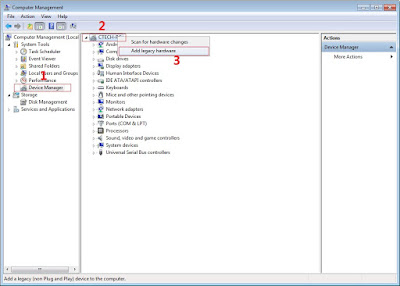
In Device Manager Right click on PC name(Right Side) and then click on Add legacy hardware as shown in image below.

add legacy
Now in Add Hardware Wizard click on Next » Install the Hardware that i manually select from a list (Advanced) » Show All Devices » Next » Have a Disk, Now select the any inf file from where you extracted the downloaded VCOM driver package.

mediatek preloader

3.  Now Click on Next and select Install this driver software anyway and wait for finishing the process.

Install driver anyway

4.  After installation is finished then Restart your computer, That's it.
If still not success in installing driver just Disabled Driver Signature Verification
1. Go to PC Settings>General>Troubleshoot>Advanced Options>Startup Settings>Disabled Driver Signature Enforcement>Then Restart
disabled driver signature verification
Once you disabled. Then follow the procedure above to install the driver. Once success proceed to next step.

II-FLASHING VIA SPFT
1. Open flash_tool.exe, click on the Download Tab
 Extract the downloaded AFP2 stock rom to the new folder you created.
Click flash tool

2. Click Scatter-loading and browse for the scatter file (MT6592_Android_scatter)
3. For Bootloop only
 Make sure flashing mode is set to "Download Only" and check mark all except Preloader.
Note: If deadboot/hardbrick set "Download+Format" and check Preloader.
4. Click Download.
mt6592-scatter-file-spft

5. Turn off your phone, connect your phone to the PC and wait for the flashing to commence.
6. Green Circle image with check will show once flashing is completed. That's it!

SPFT SUCCESS

7. Disconnect your phone in USB cord then open if still bootloop then try to factory reset in recovery settings. To go in recovery mode reboot your phone hold and press power on and volume up simultaneously until recovery mode appeared.


Credits:
Cherry Mobile Flare S3 Octa™

Labels: , , , ,

How to root CM Flare S3 Octa Lollipop and install Custom Recovery

How to root CM Flare S3 Octa Lollipop and install Custom Recovery

After an official update in Cherry Mobile Flare S3 Octa Kitkat to Lollipop version. I decided to make an update on how to root and Install Custom recovery. Hence, you can't use your custom recovery in kitkat to new update of lollipop version. I have 3 methods to root but I will teach you the most easiest way.
Root Flare S3 Octa Lollipop  Picture


Requirements:


CM Flare S3 Octa


Warning: Rooting can void your warranty!
Do it at your own risk!
FIRST METHOD
I-ROOTING
                                                   
I'm going to teach you on how to root CM Flare S3 Octa using updated Kingroot which can root even Android 5.1 or Lollipop version. 

1. Download and Install KINGROOT4.8.0.APK
2. Open Kingroot and click Optimize Now
kingroot

3. Wait to finish and click continue.
4. You can uninstall now other apps like Purify.
5. Download Rootchecker in Playstore to verify.


II-Installing Custom Recovery
Requirements:
Rashr tools
CWM (rename to recovery.img)
TWRP (rename to recovery.img)
1. Download Rashr Tool
2. Boot into Recovery
3. Locate recovery.img then flash!
Enjoy!

If Root was removed once reboot. Try to  flash this SuperSU-Beta-2.52.zip.

Here's stock recovery if you want to go back in stock recovery.


Credits:http://androidcribs.com
Kingroot
Yuweng for TWRP


SECOND METHOD
Warning: Rooting can void your warranty! Do it at your own risk!

Requirements:
CM flare S4
PC
USB CABLE

Download all:


(run exe file to load needed drivers)


2. Vcom drivers: .. (install sa pc)


(extract the file then copy to desktop)


4. CWM (rename to recovery.img)
    TWRP (rename to recovery.img)
     copy this CWM/TWRP inside (minimal adb fastbool tool folder)
recovery copy


(copy this to your root directory of sdcard(sa labas lang ng sdcard wag sa mga folder ok)


Before you Proceed don't blame me for any damage that will happen to your device...Do it at your own risk!!!!!


Procedure:
1. first enable developer option go to setting click build number (tap 7 times) now go to developer option turn on usb debugging turn on oem unlocking
OEM UNLOCKING


2. Boot your device to Fastboot mode (hold power button and vol up) choose fastboot mode or boot into bootloader, then connect your phone to PC via USB cable. Open folder fastboot from minimal adb fastboot tool(run as administrator)
Click Run me.bat
fastboot click run me.bat

3. Type this command:

"fastboot oem unlock" 


fastboot oem unlock

Then hit Enter

don't include (")  in adb ok! Just like in the image above.
4. Then ON your device follow the instructions (choose vol up to unlock/vol down if you dont want to continue unlocking)Then wait for minimal adb to successfully unlock your bootloader (it will erase all your files and restore device to factory state)remove your device then turn it on..(on screen it will show android erasing-- after that it will boot up wait 5 to 10 minutes)skip set up wizard(skip lang ng skip)then repeat step 1.then follow the next step below


Follow this guide to flash cwm recovery on your flare s4

Procedure: 
1. How to Use Minimal ADB and Fastboot Tool to Install Custom Recovery Boot your device to Fastboot mode(hold power button and vol up) choose fastboot mode)open minimal adb fastboot tool(run as admin).
 Follow step 2. above Click Run Me.bat

2. then type this command: 
"fastboot flash recovery recovery.img"


fastboot flash recovery

Then hit Enter
(again di kasama ung "" sa command hahaha)wait untill flashing finish it will take just a secs..

3. remove your device now force it to boot to recovery hold power/volume up (choose boot to recovery) then choose install files to sdcard (flash superSu) then Boom rooted kana!
always choose fix root access when rebooting... on cwm


Labels: , , , ,